
Shagelman
Participating Frequently
November 21, 2017
Question

Subtitling: How to automatically anchor text in essential graphics/motion graphics template

  • November 21, 2017
  • 2 replies
  • 1081 views

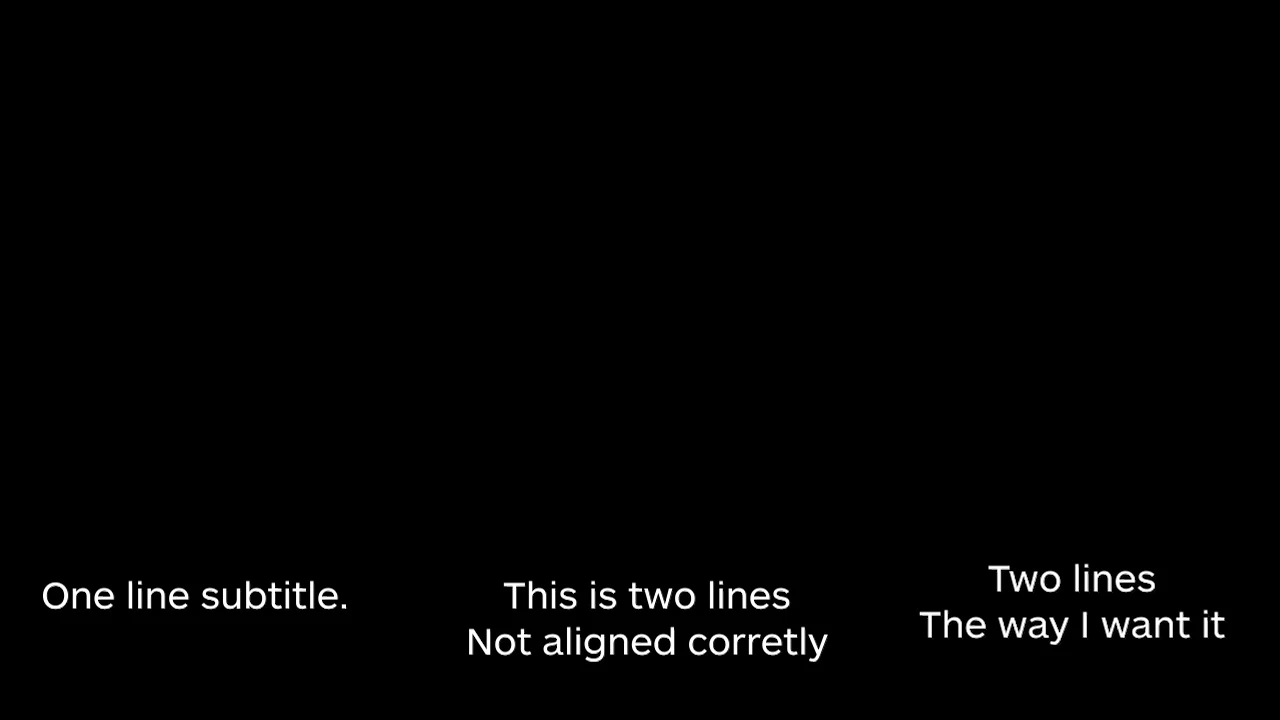
Hi there, I am using Premiere's Essential Graphics to subtitle videos and was wanting to have it automatically anchor/align text on the bottom of the page in a way that the two line subtitles are centered with other one line subtitles in the video. Right now when you add a second line it just adds it below the first line instead of raising it up a bit/anchoring it. I'll paste a picture below in case that makes no sense. I can move each two line subtitle manually but that seems pretty clunky. Is there anyway to do this? Thanks for any advice!
    This topic has been closed for replies.

    2 replies

    R Neil Haugen
    Legend
    November 21, 2017

    It looks like the way this is designed is assuming that say the text on the left is a title or role, and when you add another pinned to it, and "enter" to add lines, the lines are added below as would be appropriate to say having "Gaffers" as your title, and listing four names to the right.

    More abilities to adjust is more better, of course ... feel free to do a feature request ...

    Adobe Bug Report /Feature Request form ...

    https://www.adobe.com/cfusion/mmform/index.cfm?name=wishform

    Neil

    Everyone's mileage always varies ...
    Shagelman
    ShagelmanAuthor
    Participating Frequently
    November 21, 2017

    Thanks you two, I'll put in a feature request.

    Legend
    November 21, 2017

    There doesn't appear to be any kind of vertical Justification for titles yet.  You might have to do the work manually.

    Shagelman
    ShagelmanAuthor
    Participating Frequently
    November 21, 2017

    Thanks Jim, I was afraid of that. I'll keep my fingers crossed for future updates.

    Legend
    November 21, 2017