Participant
August 18, 2020
Answered

suddenly Premiere pro is not usable

  • August 18, 2020
  • 4 replies
  • 1062 views

I have 14.3.2 and all video images are covered by green stripes. 

This is the screenshot of a project I was working at until a few days ago. I have reopened it like this...

Any idea?
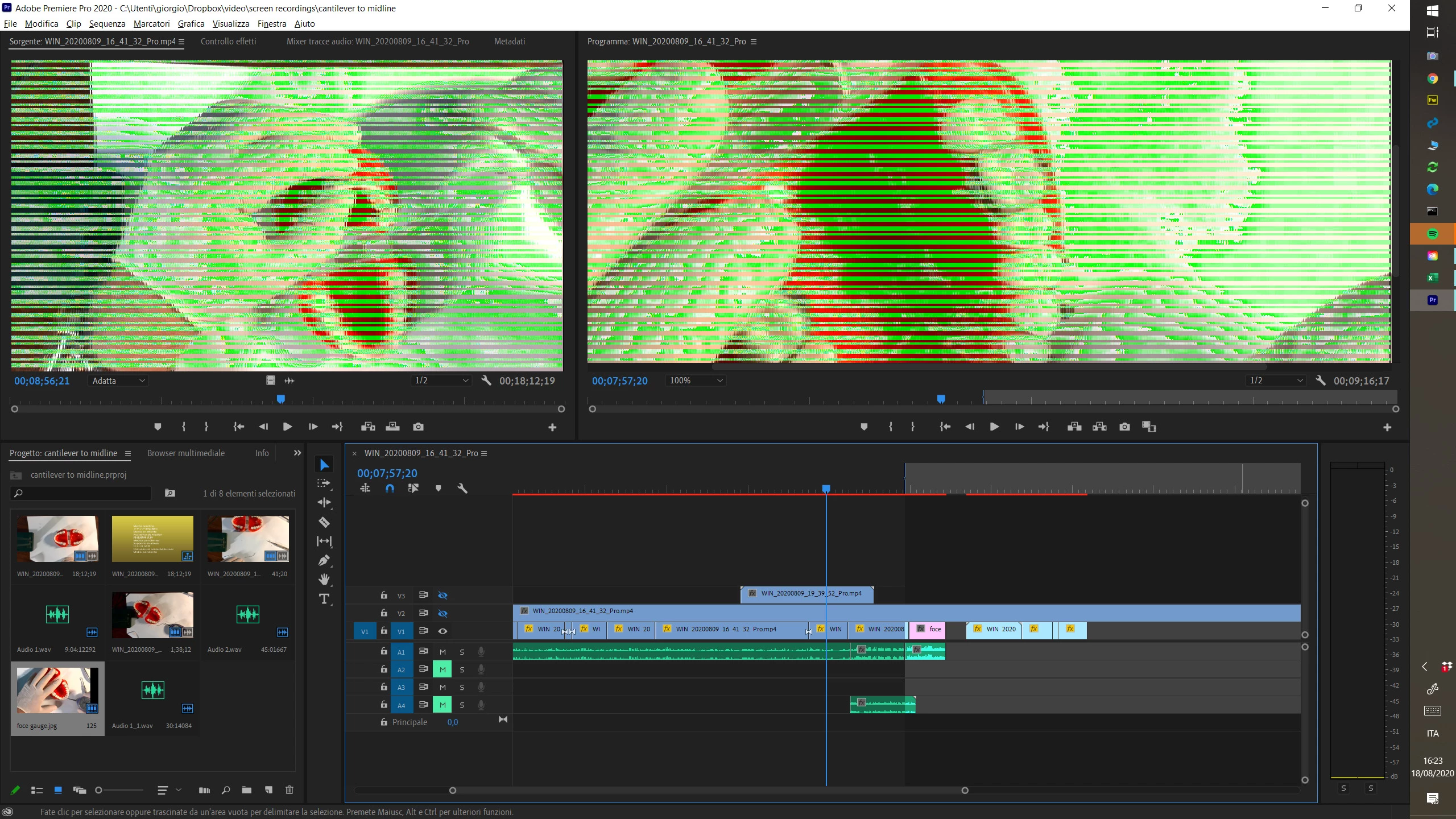

This topic has been closed for replies.
Correct answer giuliof17713219

Finally, the problem was fixed! The trouble is related to the latest intel driver (July 2020)

I have reinstalled the previous version (March) https://download.lenovo.com/pccbbs/mobiles/N27DT20W.exe and everything was restored perfectly.

This link was provided to me by Lenovo support.

I don't know if this driver is only for Lenovo (I have an X1 Yoga), so I would recommend that you check this.

4 replies

Participant
August 25, 2020

Here is what worked for me:

1. Download the latest version of Intel's graphics DCH drivers here https://downloadcenter.intel.com/download/29808/Intel-Graphics-Windows-10-DCH-Drivers

2. Go to device manager -> display adapters -> update driver 

3. Browse my computer for drivers

4. Let me pick from a list

5. Select Microsoft Basic display adapter and install.

6. Now go back to update the display driver -> browse my computer and in the search field put the path to your downloaded intel drivers.

7. Hit install and that should update the basic driver to the version you downloaded.


PPro now working without the green lines.


giuliof17713219AuthorCorrect answer
Participant
August 27, 2020

Finally, the problem was fixed! The trouble is related to the latest intel driver (July 2020)

I have reinstalled the previous version (March) https://download.lenovo.com/pccbbs/mobiles/N27DT20W.exe and everything was restored perfectly.

This link was provided to me by Lenovo support.

I don't know if this driver is only for Lenovo (I have an X1 Yoga), so I would recommend that you check this.

Participant
August 23, 2020

Found this via Google.

This is a problem with the new Intel UHD Graphics driver. The software I develop has the same issue. The bug goes away, when I switch to the dedicated graphics card.
If you don't have a dedicated graphics card, try older (or newer) Intel integraded graphics drivers.

Regards, Ben

Community Expert
August 18, 2020

try go to project settings - general - renderer and switch to software only, if it works then:

make a clean uninstall of your graphics driver, install it back, then switch back to GPU Acceleration

Participant
August 19, 2020

Thanks, but it does not work, actually settings were already with Software only Mercury Engine.

Participant
August 18, 2020

Any other project I open appears like that...