
Inspiring
December 14, 2025
Question

SUDDENLY something simple is different

  • December 14, 2025
  • 2 replies
  • 274 views

I used to just drag imported clips to timeline to create sequences.  Now nothing.

How do i make a film if i cannot fill the timeline?  Some missed setting?
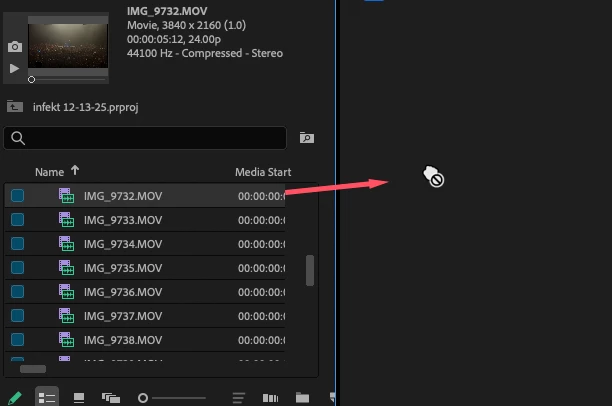
Screenshot 2025-12-14 at 1.47.14 PM.png


Also when i use the PPro dialogue to create a sequence or show, it goes the folder containing many folders of films i want to make, but it NEVER can go to the folder of the film clips to create a project?   It just shows a symbol of some image.

Screenshot 2025-12-14 at 1.51.27 PM.png

please help

2 replies

Peru Bob
Community Expert
Community Expert
December 15, 2025

Try resetting the Workspaces:
Reset a workspace
Reset the current workspace to return to its original, saved layout of panels.
1. Do one of the following:
• Click the Workspace menu icon and select Reset to Saved Layout.
• Choose Window > Workspace > Reset to Saved Layout.
from here:
https://helpx.adobe.com/premiere-pro/using/workspaces.html

Stan Jones
Community Expert
Community Expert
December 15, 2025

@Steve Zeeeee,


> I used to just drag imported clips to timeline to create sequences. Now nothing.

How do i make a film if i cannot fill the timeline? Some missed setting?''


Working for me. What version are you running?


Drag to the new icon. Or right-click, New sequence from clip.


> Also when i use the PPro dialogue to create a sequence or show, it goes the folder containing many folders of films i want to make, but it NEVER can go to the folder of the film clips to create a project? It just shows a symbol of some image.
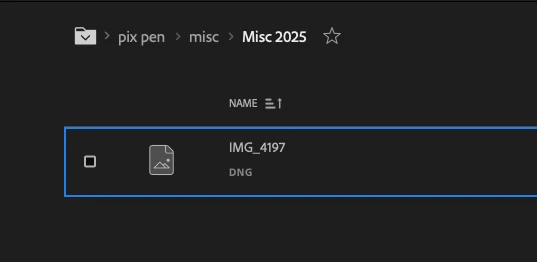
 

See this post:

https://community.adobe.com/t5/premiere-pro-discussions/video-files-not-read-if-there-is-a-dng-file-in-the-same-folder/m-p/14216027#M527107


But, as I said in the next post, using Right-click Project Panel -> Import doesn't have the issue.


Stan


Inspiring
December 15, 2025

"Working for me. What version are you running?"
PPro 25.6.3 -2
Mac 26.1
What is the "new" icon ?  None of these work.
"New sequence from clip."  It creates a new sequence
But it does not go into the timeline.

part 2:

So for YEARS they have it not work at all?


Inspiring
December 15, 2025

OK DUMB error: all this time, i'm dragging to the blank space

for my timeline.  The program opens with the timeline off screen.
insensible & unusable.
Thanks for helping.

Screenshot 2025-12-15 at 2.06.45 PM.png