Suggestions regarding dialog boxes (just deleted 60 GB footage by accident)
Just now I by accident deleted 60 GB footage by accident. This is how it happened.
1. I wanted to make footage offline, so I selected the footage and right clicked "Make offline..."
2. A dialog box came up, "Media Files Remain on Disk" / "Media Files Are Deleted"
3. I pressed "Media Files Remain on Disk"
4. Pressed OK.
5. Pressed OK again.
What happened was: By clicking "Media Files Remain on Disk", Premiere SWAPPED to "Media Files Are Deleted" without me realizing.
I then clicked OK on both dialog boxes, and since I've made footage offline 100 times before, I didn't mind reading the dialog box that came up. I've obviously have never deleted material before using the "Make Offline..."-feature. Didn't even know it was possible.(Yes, I'm a fast paced premiere user, I know I should have read the dialog box but I'm sure I'm not the only one that doesn't read dialog boxes when you do something for the hundredth time)
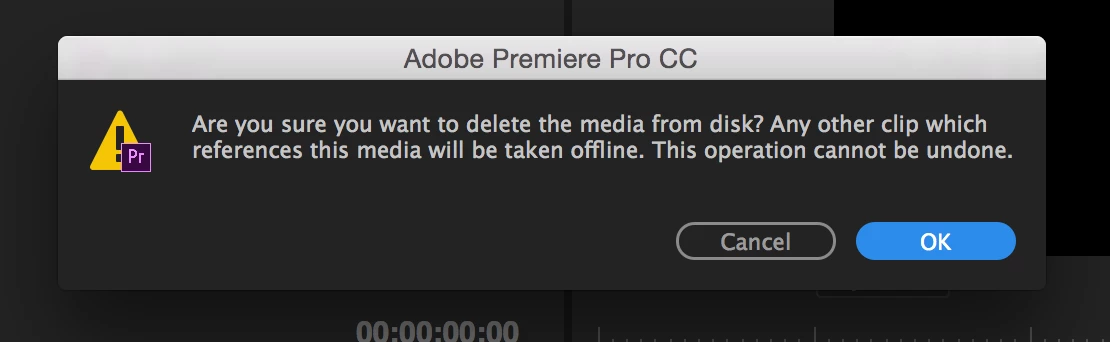
My suggestions:
1. Use a "Check mark" or in the dialog boxes so there is no question which option the user wants to use.

Look at other buttons i googled that seem pressed/activated. In your UI, the logic is quite the opposite, what actually looks like a pressed button is not.



2. Take away the swap function. If I press the option I want to use, why does premiere swap to the other one? Totally confusing.
3. When I pressed on "Media Files Remain on Disk", it got a blue circle. Blue is the color that in the user interface indicates that something is selected. Example: When I want to use the roll tool, I press it and it becomes blue. Or if I want to activate the Snap-feature, I press the button and it becomes blue.
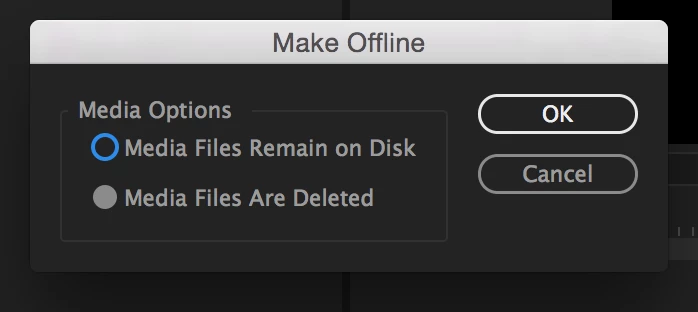
4. I had no idea that "Make offline..." feature could even delete files. I've always interpreted the dialog box as two questions, "Do the media files remain on disk" or "Are the media files deleted". Please change the text so it's easier to understand. My English is not so good but something like "Let media files remain on disk" / "Delete the media files from disk" would be easier to understand and more intuitive in my humble opinion.
Fortunately we had backup of the files, but what if this happens to a user that cannot recover the footage.
Please do something about this.
 AdChoices