arjunk.04
Participant
August 29, 2021
Question

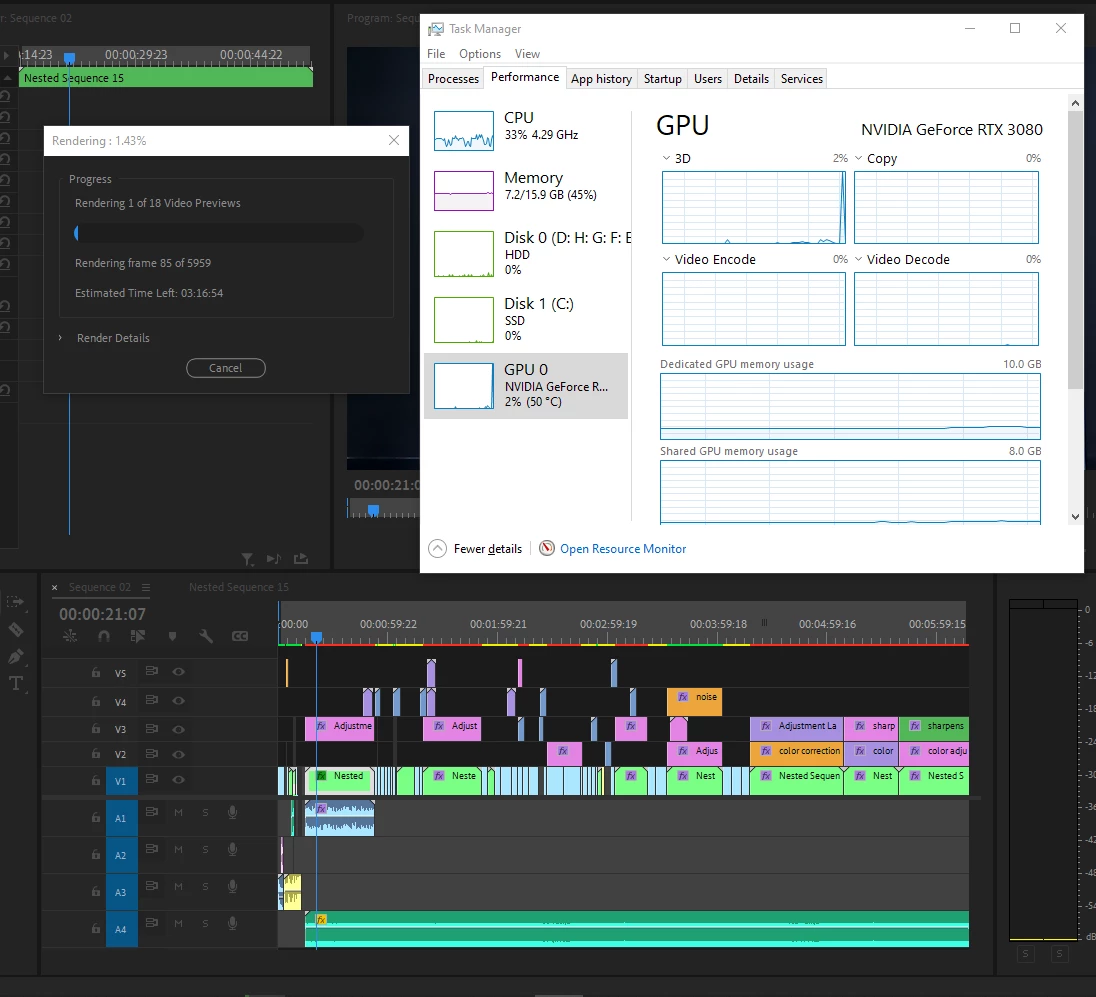
Super Slow Rendering, Rendering uses CPU instead of GPU. All settings checked correctly.

  • August 29, 2021
  • 1 reply
  • 242 views

I upgraded my PC, bought RTX 3080, Ryzen 5000 series processor but premiere pro use CPU to render the files, It is taking alot of time than I imagined before upgrading my PC. I have checked all the available option and tips, tricks but GPU usage doesn't go up more than 2-3% or stays idle at 0% but while exporting sometimes GPU crosses upto 50% as well. It means, my GPU is working fine while exporting, I just have a problem while rendering the files. Any help would be appreciated. PS I am on the latest version of premire pro. Thank You!
 

This topic has been closed for replies.

1 reply

Inspiring
August 29, 2021

If you are not using video effects or rendering to H.264/265 the GPU will not be used that much. That being said your CPU should be used at about 100% not 33%. Are you using plugins? Try dissabling Nvenc if it is enabled. 

arjunk.04
arjunk.04Author
Participant
August 29, 2021

CPU fluctates, looks normal. I'm just intensed since GPU uses is 0% and I'm like why tf did I upgrade if it doesn't help in faster rendering/exporting. Some squence takes a lot of time to export as well. My 6th gen Intel powered CPU with integrated GPU Laptop may finish rendering/exporting faster than currently what I am dealing with.