
Participant
November 1, 2019
Question

Swiftly Studio 850 Seamless Transitions doesnt work in Premiere 2019

  • November 1, 2019
  • 3 replies
  • 13505 views

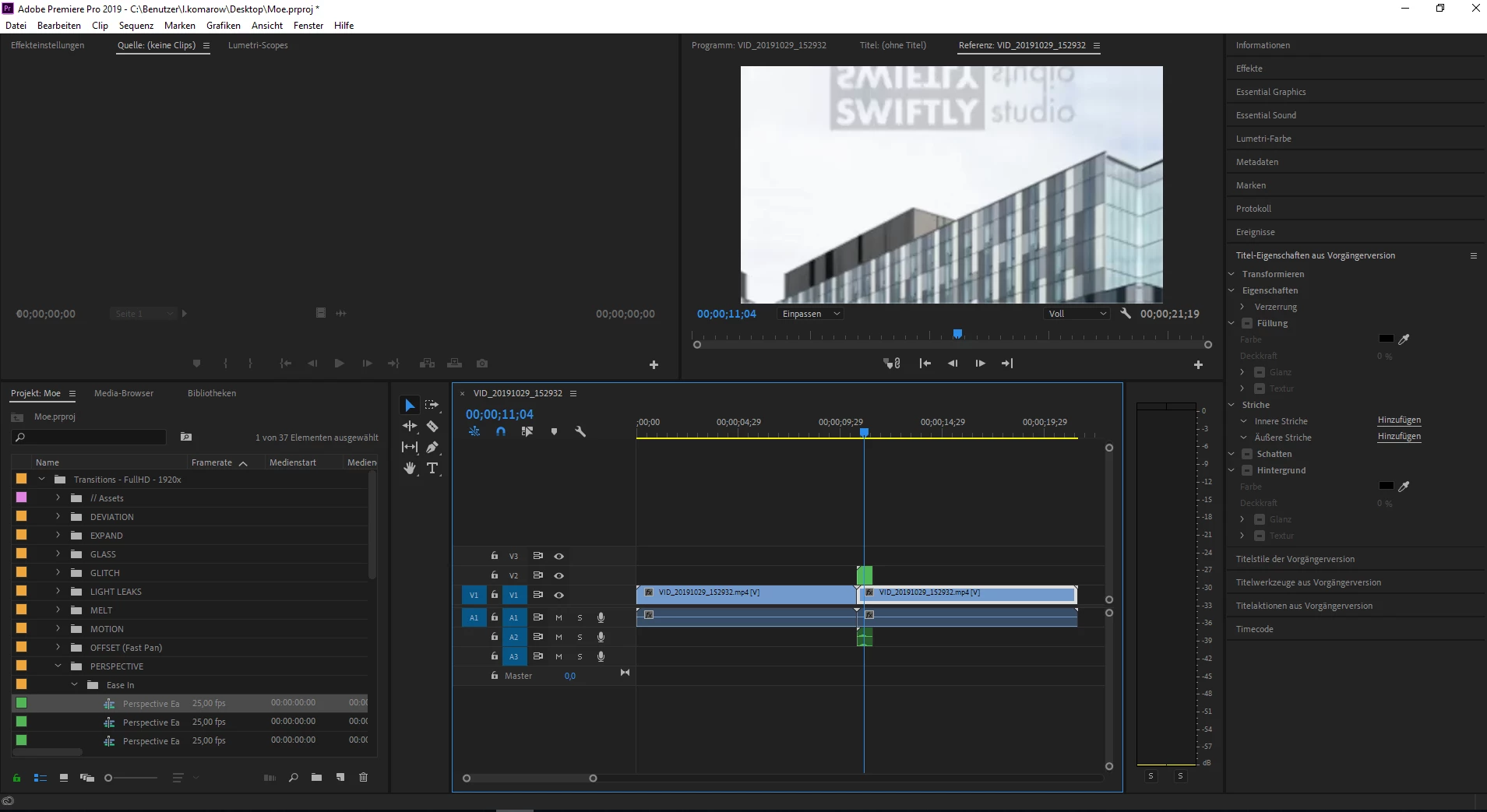
When i import my Swiftly Studio 850 Seamless Transitions, i can see the effects but if i lay it over my clips, i only can see the example effect, it doesnt adjust into my clip anymore, as you can see on the picture. What can i do to fix the problem?
This topic has been closed for replies.

3 replies

Participant
November 1, 2020

They got me to 🤦🏽‍♂

Participant
March 5, 2020

Hi Senec, I too bought the transition pack and struggled at first. But I now know how to use them.

I had a look at your screenshot and saw that the one problem that you have one of the buttons activated. You need to turn off the nesting button which is found just underneath the timecode. Your transition are nested together which does not allow it to function properly. Once you have that sorted you can drag the transition onto your timeline. You might still see the preview image of the transition thumbnail, just check your timeline and you will find the image layer and delete it. Hope this helps.

Staphon
Participant
May 4, 2020

Hello im staphon and im fairly new to this whole editing world. Im going  to try this out and if it works for me. i want to say thanks in advance.  heck thanks anyway for trying to help have a good one.  Sincerly. Staphon of Cut and Shoot ent ps just tried. which one is nesterd button? i know how to. nest a sequence

Participant
May 5, 2020

Hi Staphon, you are so welcome. Glad I could help. The nest button is the 1st button just under the time code. If you look at the image I posted. I hope that helps. 🙂

Evgeny Lancer
Participant
February 5, 2020

Hello!


Just to have this information indexed in a search: Swiftly Studio is a real SCAM!


If you bought the 850 Seamless Transitions package from them, then in fact they resold you my original transitions package. It can only be bought here: https://videohive.net/item/handy-transitions-for-premiere-pro/22125468


As for your question (I understand that this is no longer relevant), you just need to check this step:

https://videolancer.net/seamless-transitions-for-premiere-pro/guide/#timeline-settings

Participant
April 27, 2020

Hi - if its your transitions package that they are selling illegally you should contact Facebook - they are advertising like mad on Facebook right now, making a lot of money that it sounds like should rightfully be yours.