

Synchronize option
Can you figure out the detailed workings of synchronization? While some segments synchronize smoothly without any issues, sometimes nonsensical, wild stories unfold. I am syncing a large number of video files with a very long nested audio track. I chopped up this nest into smaller nests because nothing was syncing with that overly long nest. As described in the screenshots: firstly, how to avoid a situation where the program does synchronize my media, but ends up overlaying two different synchronizations, creating chaos? For example, sometimes it overlays two completely different audio clips, other times it duplicates a camera file and syncs it. I've described the screenshots below; perhaps someone has advice on how to configure the settings in synchronization..
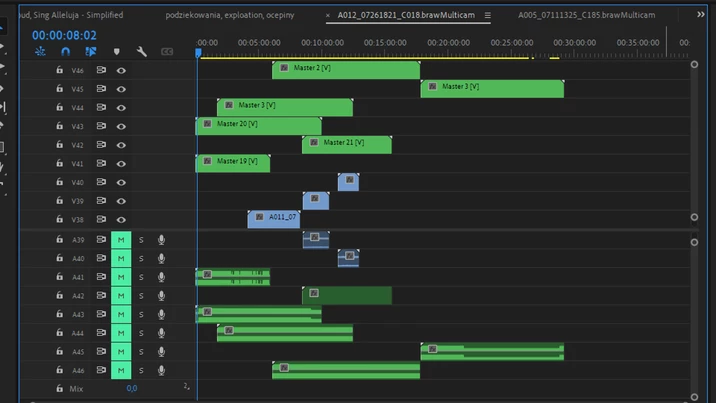
As you can see, program synchronize a few off totally diffrent pieces of audio....
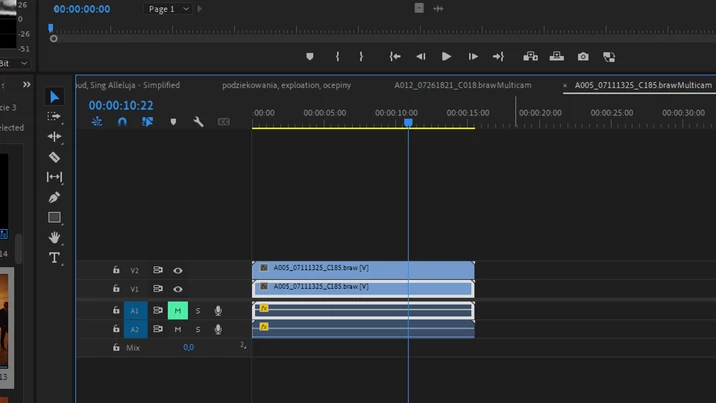
And here, program just duplicate video clip and synchronize it 😄 Now I have a lot off useless sequences qith double video clip. Why? How to avoid it?


 AdChoices