clémentd66171738
Participating Frequently
August 3, 2020
Answered

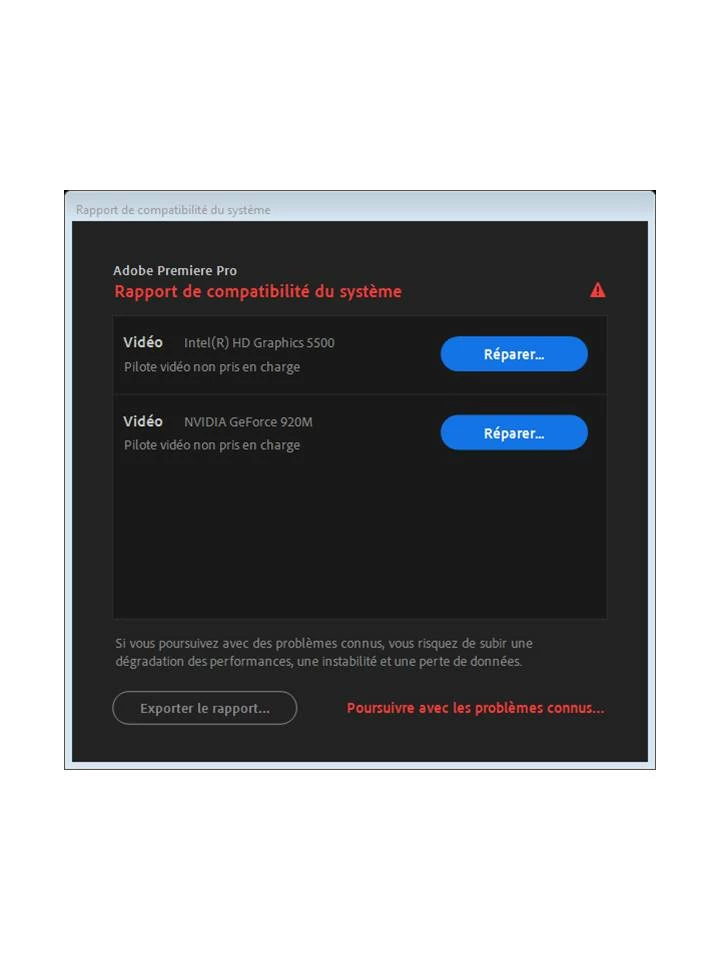
System compatibility report in Premiere pro

  • August 3, 2020
  • 2 replies
  • 1455 views

Hello,


I need your help. Indeed with Premier pro, i have still an opening message who told that my Intel and Nvidia drivers are not good. So i did the update but its still not good..... I dont know what to do .


Thanks for your help

This topic has been closed for replies.
Correct answer RjL190365

I am very disappointed to tell you this, but both of your system's GPUs are now either legacy or obsolete, according to both Intel and Nvidia. You see, all 4th- and 5th-Generation CPUs have been in "legacy" support status at Intel itself, with no new compatibility fixes since 2015 and only critical security fixes in the new drivers that have been released for these CPUs since 2016. Meanwhile, the GeForce 920m is actually a Kepler mobile GPU, having been based on the GK208 GPU whose support at Nvidia for mobile parts had already been terminated in March of last year, with it and other mobile Kepler GPUs officially dropping off support completely (outside of archived drivers) at the end of this past April. The last driver that was released for the mobile Kepler GeForce GPUs was version 425.31, released in April 2019. Premiere Pro 2020 now requires driver version 430.86 or higher just to run properly. Unfortunately, 430.86 or any newer driver is not at all compatible with any mobile Kepler GPU (although desktop Kepler GPUs continue to be supported, up to and including the current 451.67 Game Ready Driver).


And neither your computer's manufacturer nor Adobe has anything at all whatsoever to do with all that. As some of the biggest members of the tech industry, they have no choice but to comply with the chip makers' support policies and status. That means that they must no longer support anything that's legacy, vintage or obsolete. In the case of your computer manufacturer, it can no longer issue new drivers at all for the GPU portion of your computer, while Adobe is now required to make any new version of its software at least partially incompatible with such old hardware.


At this point the only way that you can continue to run Premiere Pro with any GPU acceleration whatsoever would be to downgrade Premiere Pro itself to version 13.1.5. But do so before this coming Fall as all versions below the latest 14.x version will become permanently unavailable with the release of version 15. If you ignore those compatibility warnings, and you wish to continue using Premiere Pro 2020 anyway, then the only way that it can run "properly" would be to disable hardware-accelerated decoding and encoding in the Preferences, and then in the Project settings, select "Mercury Playback Engine Software Only" as the renderer every time you create a new project. You will not take any advantage at all whatsoever of Premiere Pro 2020's expanded hardware-accelerated features, and you will experience a major performance decrease due to hardware features that worked with previous versions of Premiere Pro now no longer compatible at all with such older hardware.


In other words, you've effectively downgraded all the way down to Premiere Pro CS4 (2008) levels of performance with the update to Premiere Pro 2020, as far as your system is concerned.

2 replies

RjL190365Correct answer
Legend
August 3, 2020

I am very disappointed to tell you this, but both of your system's GPUs are now either legacy or obsolete, according to both Intel and Nvidia. You see, all 4th- and 5th-Generation CPUs have been in "legacy" support status at Intel itself, with no new compatibility fixes since 2015 and only critical security fixes in the new drivers that have been released for these CPUs since 2016. Meanwhile, the GeForce 920m is actually a Kepler mobile GPU, having been based on the GK208 GPU whose support at Nvidia for mobile parts had already been terminated in March of last year, with it and other mobile Kepler GPUs officially dropping off support completely (outside of archived drivers) at the end of this past April. The last driver that was released for the mobile Kepler GeForce GPUs was version 425.31, released in April 2019. Premiere Pro 2020 now requires driver version 430.86 or higher just to run properly. Unfortunately, 430.86 or any newer driver is not at all compatible with any mobile Kepler GPU (although desktop Kepler GPUs continue to be supported, up to and including the current 451.67 Game Ready Driver).


And neither your computer's manufacturer nor Adobe has anything at all whatsoever to do with all that. As some of the biggest members of the tech industry, they have no choice but to comply with the chip makers' support policies and status. That means that they must no longer support anything that's legacy, vintage or obsolete. In the case of your computer manufacturer, it can no longer issue new drivers at all for the GPU portion of your computer, while Adobe is now required to make any new version of its software at least partially incompatible with such old hardware.


At this point the only way that you can continue to run Premiere Pro with any GPU acceleration whatsoever would be to downgrade Premiere Pro itself to version 13.1.5. But do so before this coming Fall as all versions below the latest 14.x version will become permanently unavailable with the release of version 15. If you ignore those compatibility warnings, and you wish to continue using Premiere Pro 2020 anyway, then the only way that it can run "properly" would be to disable hardware-accelerated decoding and encoding in the Preferences, and then in the Project settings, select "Mercury Playback Engine Software Only" as the renderer every time you create a new project. You will not take any advantage at all whatsoever of Premiere Pro 2020's expanded hardware-accelerated features, and you will experience a major performance decrease due to hardware features that worked with previous versions of Premiere Pro now no longer compatible at all with such older hardware.


In other words, you've effectively downgraded all the way down to Premiere Pro CS4 (2008) levels of performance with the update to Premiere Pro 2020, as far as your system is concerned.
clémentd66171738
Participating Frequently
August 13, 2020

Thanks for your answer

Community Expert
August 3, 2020

I’m not sure what you updated but please make sure that the graphics card drivers are up to date.

clémentd66171738
Participating Frequently
August 3, 2020

Already done ... Nothing new happened