This topic has been closed for replies.

2 replies

Conrad_C
Community Expert
Community Expert
February 6, 2020

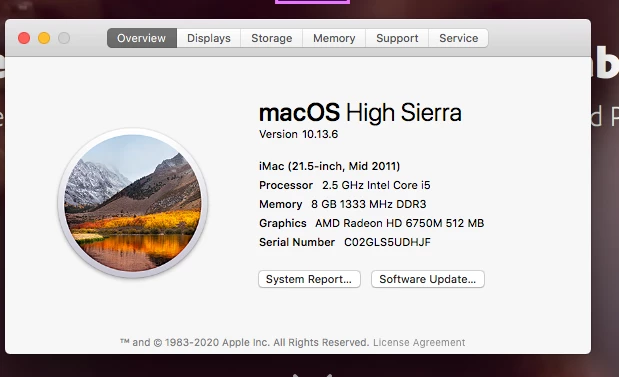
The current Premiere Pro system requirements for Mac specify an Intel 6th generation CPU. But that iMac, a 2011 model that is almost 10 years old, has a very old 2nd generation Intel Core CPU. Adobe recommends 16GB RAM for HD media, but that iMac has only 8GB RAM. Adobe also states a minimum 2GB of GPU VRAM (4GB recommended), but that iMac’s 512MB of VRAM is only 1/4 of the minimum needed.


Of those three specs, you might be able to upgrade the RAM, but you will never be able to upgrade the CPU or the GPU VRAM. If the internal storage is an original factory hard drive and not an SSD, that will also result in slow performance during video editing.


If you want to quickly edit 1080p video with that iMac, you will want to use less demanding video editing software. But the current versions of Apple Final Cut Pro and DaVinci Resolve have similar system requirements, too high for a 2011 iMac, so you might try another application such as Apple iMovie. If you need fast editing performance using Premiere Pro or similar professional video editing applications, you’ll need a newer, more powerful computer.

S_Gans
Community Expert
Community Expert
February 5, 2020

8GB of RAM is quite low for video - and your graphics card will likely be an issue as well. 

Per the System Requirements page (https://helpx.adobe.com/premiere-pro/system-requirements.html), you're at the bare minimum for RAM, and you only have 1/2 GB of GPU VRAM. If your graphics card was stronger, you'd be able to edit 1080 with lags, but this combination will likely prove frustrating for your work in Premiere. 

Adobe Community Expert / Adobe Certified Instructor