
Inspiring
September 6, 2017
Answered

Temporal Interpolation Ease In AND Out

  • September 6, 2017
  • 1 reply
  • 1992 views

Hello - I am faking camera movement, and I want to create smooth movement

Is there a preset to automatically set ALL position keyframes to Ease In AND Out?

I know you can drag the bezier handles to create and easing in and out movement, but there are hundreds of them and I'd like the option to convert all at same time
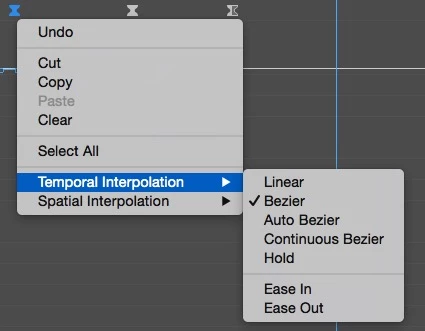
Using Premiere 2017

Thanks,

Darren

This topic has been closed for replies.
Correct answer bashi-bazouk

Thanks that helps, I wanted the movement to completely stop and start at each keyframe and also increase the acceleration/deceleration, but I think I answered my own question, by dragging the handles down :

1 reply

Jose Panadero
Community Expert
Community Expert
September 6, 2017

Select all your keyframes creating an area over them or clicking the word POSITION, then using the secondary button select Bezier under Temporal Interpolation. This way you will have the Ease In and Ease Out that you are looking for.

bashi-bazoukAuthorCorrect answer
Inspiring
September 6, 2017

Thanks that helps, I wanted the movement to completely stop and start at each keyframe and also increase the acceleration/deceleration, but I think I answered my own question, by dragging the handles down :