
Text blocks not showing up in Project panel after create it in timeline, since today...
Since today, all my previous projects I used to have the text blocks appeared on my Project panel once I create them, but today... Gone!
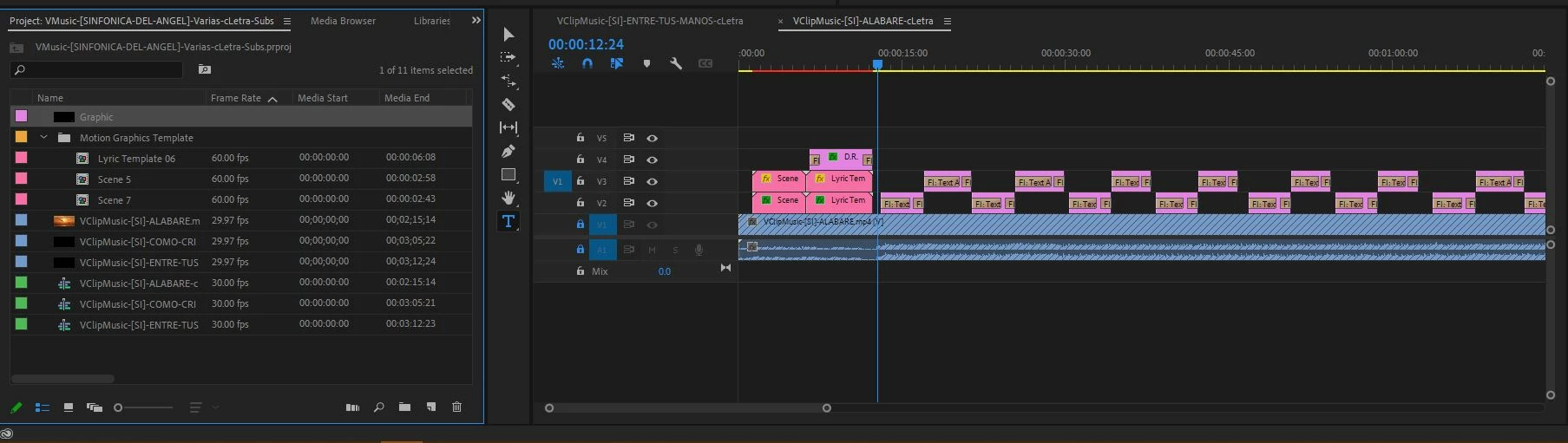
I've tried to find out what's going on, and I found one that says it fixes (Graphics and Titles->Upgrade To Source Graphics) , but all the tags in Project panel for those texts are the same! 'Graphic'.
The question is how can I get back the same behavior, how to restore that setting as before, to have all the corresponing tags for the texts and to have them included by default in Project Panel once are created, this is also because I used to label them with a color depending of the context so I can find them easily, Now when I close the program and open it back again the label are gone.
Please help me with this issue, I know that this is not a matter of live or death but it really helped me a lot in my productivity.
Thanks in advance.


 AdChoices