
lisad23103822
Participating Frequently
January 7, 2019
해결됨

Text boxes have disappeared in Premiere Pro

  • January 7, 2019
  • 4 답변들
  • 27057 조회

Hello everyone.

I recently started adding titles to my Premiere Pro project. Until an hour ago, the text boxes would just show whenever I dragged the text button like I always do.

But now, the text boxes don't appear anymore. I can still see the text itself and I can edit it (without an indication of where I'm typing because the text-cursor has also vanished), but I can't see the boxes around them with the handles to make them bigger or smaller. Selecting the text also doesn't work anymore.
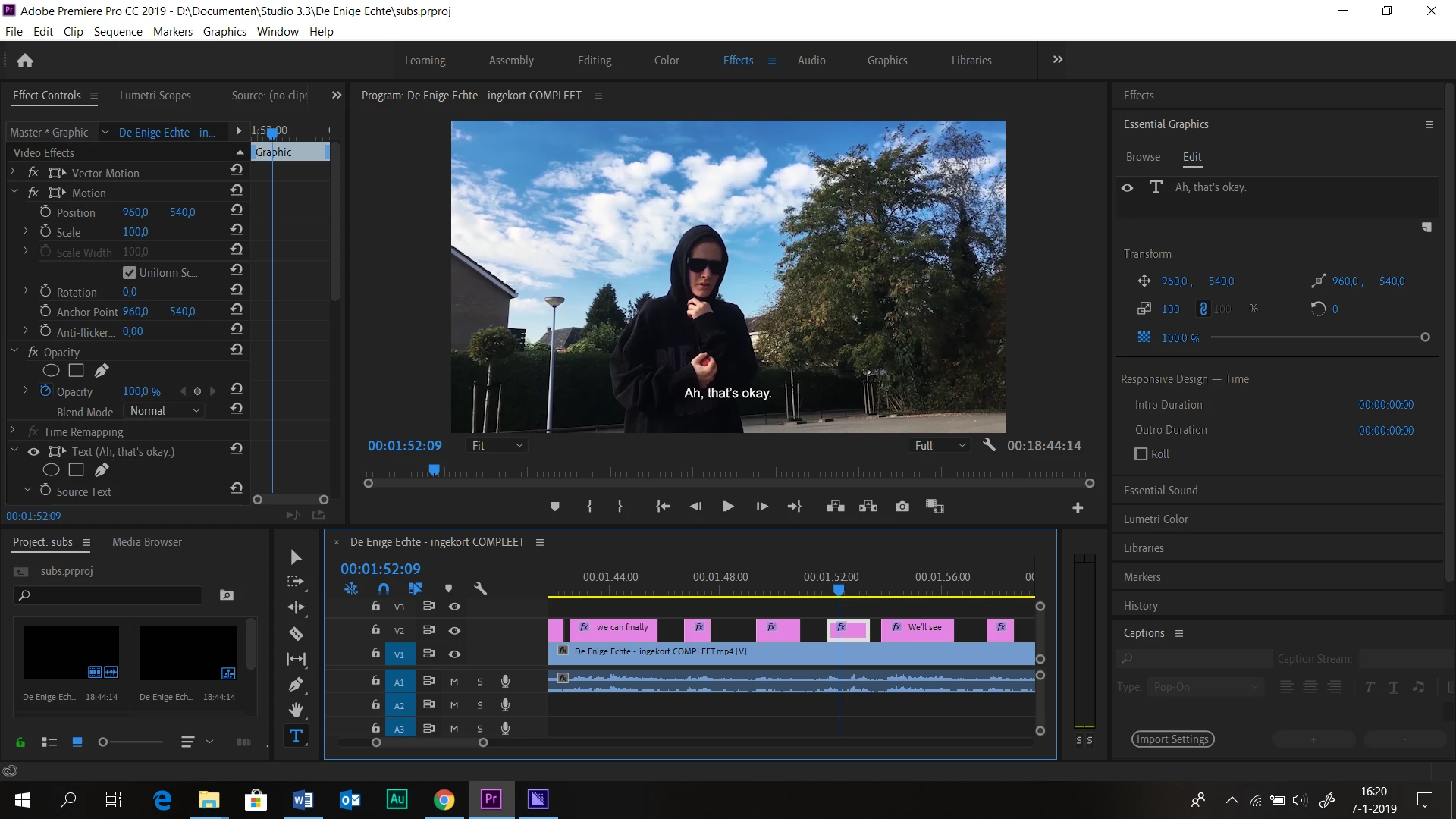
I clicked on the Text tool and the box on the timeline, yet the box on the screen and its handles don't appear.

I tried to search if I accidentally did something with the preferences, but that's all the same. I seriously don't understand what on earth could have happened. Please, help me. And yes, I've already tried restarting the program, creating a new file, a new sequence, everything; the boxes still don't show.

Thank you for reading! I hope anyone can help me with this because I have a serious deadline coming up.

Regards,

Lisa

이 주제는 답변이 닫혔습니다.
최고의 답변: Stan Jones

The most frequent reason for this: you have Windows advanced scaling set to 125%. (Microsoft recommendation is not to set custom scaling.) While you should be okay, it does not work in some recent versions of PR. See this thread for info and workarounds.

4 답변

Participant
March 22, 2020

I have the same problem in v14.0.4, this thing should be solved, 125% scale on 1920x1080 is something set by default on many laptops!
Thanks to jb_5549_att answer, I solved it by adding the rulers.

Participant
May 23, 2019

I was able to get the bounding box for a text object to display in Premiere Pro (2019 - version 13.1.2 build 9) by going to the Program monitor (the big panel in the top-right corner of the Editing layout (Window > Workspaces > Editing), the one that shows the video preview), selecting the wrench icon at the bottom, and then turning on Rulers.

Without the rulers turned on I get no bounding box on the text, nor on masks, sssoooo....yeah...it's inconvenient in the default setting. But we're good now though!

Stan Jones
Community Expert
Community Expert
May 24, 2019

Thanks for reporting.

Here's another thread where that was reported as a workaround for using 125% advanced windows scaling.

Re: CAN'T HIGHLIGHT TEXT OR ADJUST SIZE PREMIERE CC19 PROBLEM

Stan Jones
Community Expert
Community Expert
January 7, 2019

The most frequent reason for this: you have Windows advanced scaling set to 125%. (Microsoft recommendation is not to set custom scaling.) While you should be okay, it does not work in some recent versions of PR. See this thread for info and workarounds.

lisad23103822
lisad23103822작성자
Participating Frequently
January 7, 2019

Thank you very much for your response! I couldn't really fix it myself, but after I pressed buttons for thirty minutes, the boxes came back!

Very odd indeed, but thank you for your help.

Stan Jones
Community Expert
Community Expert
January 7, 2019

Very small adjustments of the window up or down can make the boxes appear or disappear....

kglad
Community Expert
Community Expert
January 7, 2019