Participant
May 19, 2021
Question

Text in text box disappears in a certain range of screen

  • May 19, 2021
  • 3 replies
  • 5425 views

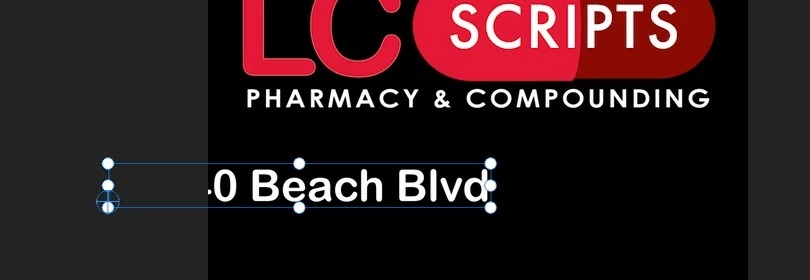
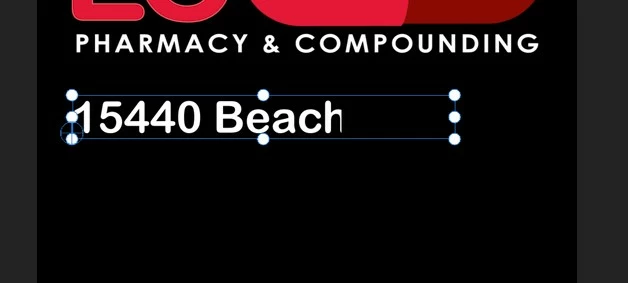
This problem is driving me crazy.  I can't seem to put a text box to occupy the entire video window.  There's an imaginary boundary in the video and as I type text that hits this border, it doesn't show the text.  I've included screenshots to show the problem.  What am I doing wrong???

To understand what's happening, the text says "15440 Beach Blvd."  As soon as I hit that boundary underneath the "M" in compounding, the text disappears.  If I drag the text box to the left, you can see the text.  If I drag the box rightward, the text will disappear as it hits the boundary.
3 replies

adobbe-user
Participant
February 12, 2026

Having the same issue. Cannot figure what is blocking my text.


Ann Bens
Community Expert
Community Expert
February 12, 2026

Make sure vector motion and motion are set to default

Instead of using a bounding box just start typing your text.

Known Participant
December 15, 2024

Any update on this problem?


Kevin-Monahan
Community Manager
Community Manager
December 19, 2024

Hi @reid_3125,

This is a bit of an old post. Can you give us more information and screenshots about your system and version of Premiere Pro? I hope we can help you.


Thanks,
Kevin


Kevin Monahan - Sr. Community and Engagement Strategist – Adobe Pro Video and Audio
Participant
May 19, 2021

I'm adding this to help provide clues.  So the highlighted text box says "15440 Beach Blvd".  The "Blvd" is obscured at the boundary.  I added another text box that only says "Blvd".  You can see that it's visible.

Participating Frequently
May 19, 2021

Hi, most likely the position of the clip in which the text is placed has been moved to the left, try changing the x position under the Video - Motion effect (see picture)

Participant
May 19, 2021

thanks for the reply.  yes, i try to move around by dragging that number but same problem.