
Participant
Feb 22, 2024 6:37 AM UTC
Answered

Text on the labels not visible

Hi, 

I´m completely new to Premiere pro and I need help with text visibility on the labels. 


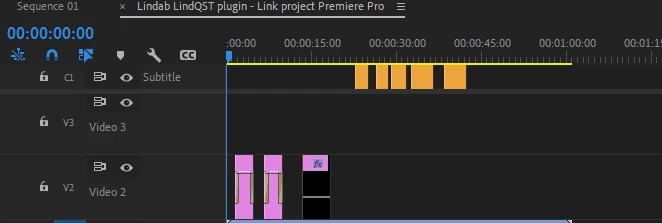
In my timeline, I cannot see for  text on these pink or orange labels. Pink is the text I pasted to the video and orange is the captions. Can someone advice me how to enable it?



This topic is closed to new replies. Start a new post to keep the conversation going.
mattchristensen
mattchristensenCorrect answer
Legend
Feb 22, 2024 3:21 PM UTC

Welcome to Premiere Pro! Click on the Wrench button above your tracks in the timeline and make sure "Show Video Names" is turned on. If it is, you'll see the names once you zoom in enough that the clips are long enough to show their names. You can use the + and - keys to zoom in and out of the timeline.

1 reply

mattchristensen
mattchristensenCorrect answer
Legend
Feb 22, 2024 3:21 PM UTC

Welcome to Premiere Pro! Click on the Wrench button above your tracks in the timeline and make sure "Show Video Names" is turned on. If it is, you'll see the names once you zoom in enough that the clips are long enough to show their names. You can use the + and - keys to zoom in and out of the timeline.

Translate