Participant
December 18, 2024
Answered

Text Panel Speaker Delete issue

  • December 18, 2024
  • 1 reply
  • 254 views

I am not able to delete a Speaker after filtering it out, The delete option is blured, see the image
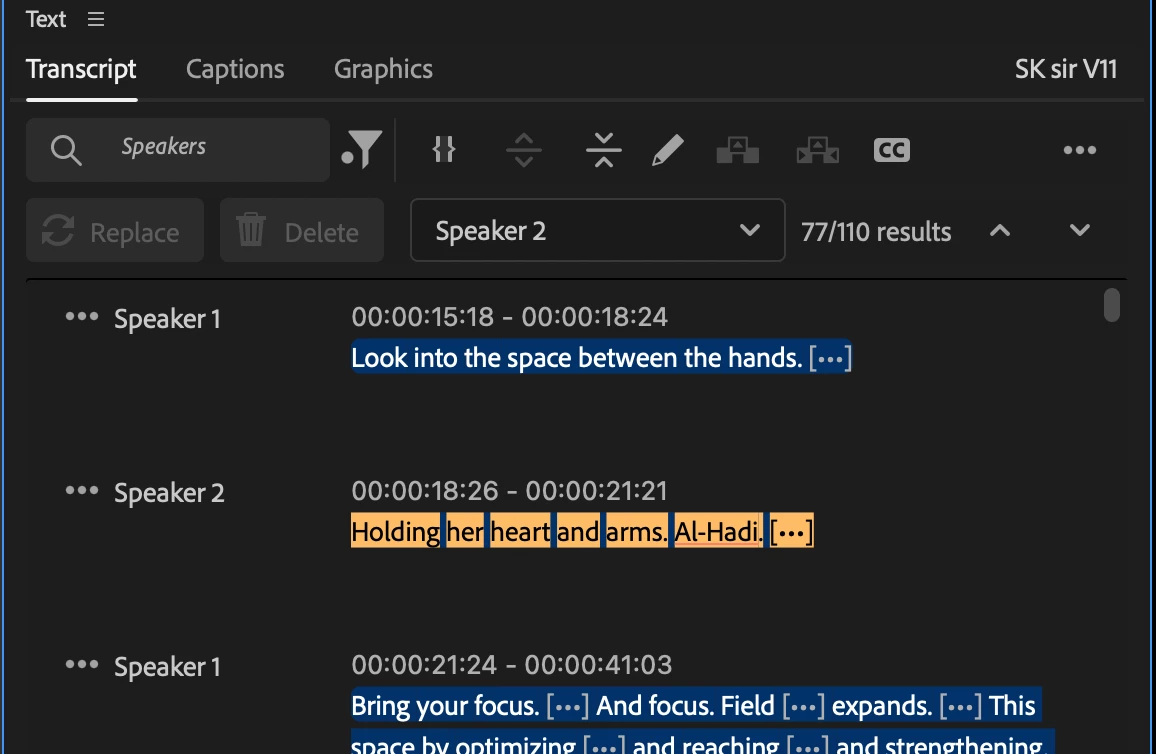

This topic has been closed for replies.
Correct answer PaulMurphy

It looks like you’re viewing the transcript from the Source Monitor.

To switch to the Program Monitor transcript, you can try one of the following:

  • Select the Timeline panel, then return to the Text panel.
  • Click the Show Program Monitor Transcript button, located in the bottom-left corner of the Text panel.

1 reply

PaulMurphyCommunity ExpertCorrect answer
Community Expert
December 18, 2024

It looks like you’re viewing the transcript from the Source Monitor.

To switch to the Program Monitor transcript, you can try one of the following:

  • Select the Timeline panel, then return to the Text panel.
  • Click the Show Program Monitor Transcript button, located in the bottom-left corner of the Text panel.
Participant
December 26, 2024

No, It is already on Pragram Monitor

Community Expert
December 26, 2024

If you click the three dots in the top-right corner of the Text Panel, does it say "Generate text-based editing transcript" or "Generate static transcript"?

If it says "Generate text-based editing transcript", it means you're using a static transcript in your sequence, which cannot be edited. To enable text-based editing, select "Generate text-based editing transcript" from the menu.