
Hi_Soeren
Inspiring
April 23, 2024
Answered

Text-Pop-Up-Effekt-Problem

  • April 23, 2024
  • 3 replies
  • 668 views

Ich habe das problem, dass, wenn der Text im Bewegungsmenü zB größer skaliert wird, sich die Ausweitung des Textes nur nach rechts und oben auswirkt, der Text also nur nach rechts oben hin wächst. Er bleibt anscheinend an seiner Position in der Textzeile. Ich bin noch ziemlich neu und habe n Tutorial auf Youtube gesehen und bei ihm ist die Skalierung in alle Richtungen verlaufen, der Text ist also "mittig" geblieben. Komisch ist, dass er dabei nur an der Skalierung im Bewegungsmenü eingestellt hat. Ich muss jetzt immer die Position des Textes anpassen, bräuchte da mal Hilfe.
Ich hoffe der Anhang kommt als GIF.


Moderator notes: A couple of changes were made to your post.


  • The FAQ label has been removed. Please do not label troubleshooting posts with "FAQ." The label is intended to refer to actual FAQs in the forum.
  • The How to label has been removed. Please do not label posts with "How to." The label is meant to refer to actual How To posts in the forum.

Adobe Staff and Adobe Experts are the people meant to use those labels. I apologize if this issue was unclear. Thank you.
This topic has been closed for replies.
Correct answer Theresa Rostek

Hi @Hi_Soeren,


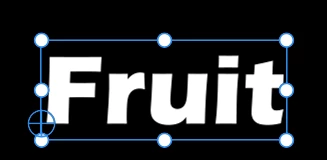
You'll want to adjust the anchor point to where you want the scaling to happen from. Click on your text, you'll see a circle with a crosshairs at the lower left (because your text is left aligned, it is auto-set to be left and baseline by default).

The crosshairs is your anchor point, click and drag it to the center if you want it to resize from the center, to the top left if you want it to resize downwards. Also, you'll want to make sure you are creating keyframes on the Text's Scale property and not Vector Motion or Video Motion as this anchor point does not apply to those properties.


Cheers,

Theresa


3 replies

AnnikaKoenig
Legend
April 25, 2024

Genau, wie @Theresa Rostek gesagt hat, hat das was mit dem Anchor Point zu tun. Wenn du den Text zentrierst passiert das für dich automatisch (siehe Screenshot)

Theresa Rostek
Community Manager
Theresa RostekCommunity ManagerCorrect answer
Community Manager
April 23, 2024

Hi @Hi_Soeren,


You'll want to adjust the anchor point to where you want the scaling to happen from. Click on your text, you'll see a circle with a crosshairs at the lower left (because your text is left aligned, it is auto-set to be left and baseline by default).

The crosshairs is your anchor point, click and drag it to the center if you want it to resize from the center, to the top left if you want it to resize downwards. Also, you'll want to make sure you are creating keyframes on the Text's Scale property and not Vector Motion or Video Motion as this anchor point does not apply to those properties.


Cheers,

Theresa


Motion Graphics, Premiere Pro
Hi_Soeren
Hi_SoerenAuthor
Inspiring
April 23, 2024

Hier ein besseres GIF