
Known Participant
Jun 25, 2022 2:34 AM UTC
Answered

Text tool not showing

I found another thread with a similar problem where it was suggested to update and reboot. I've done both of those things and still don't seem to have a Text tool. I'm not wanting the Title tool - the newer Text tool. I'm a newbie so I might be missing something simple but I thought it was supposed to be below the magnifying glass. My screen looks like this:
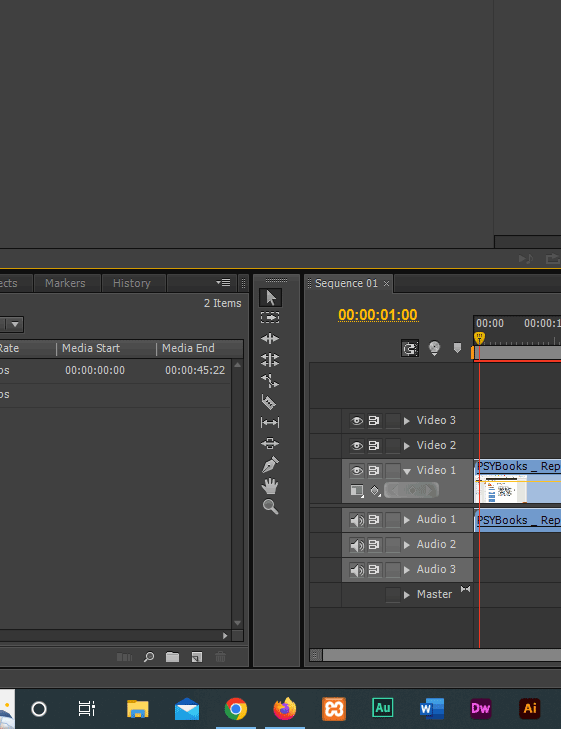


Any ideas?


Thanks in advance.

Carlos ZiadeCorrect answer
Community Expert
Jun 25, 2022 5:09 AM UTC

reset premiere pro preferences

hold ALT(or Option) on the splash screen

6 replies

Ann Bens
Community Expert
Community Expert
Jun 25, 2022 2:00 PM UTC

Update to what?

CS6 (screenshot) does not have a TEXT tool.

2017 was the first version with the new tool.

Translate
Carlos ZiadeCommunity ExpertCorrect answer
Community Expert
Jun 25, 2022 5:09 AM UTC

reset premiere pro preferences

hold ALT(or Option) on the splash screen

Translate
Known Participant
Jun 25, 2022 5:22 AM UTC

Sorry - I'm not following. Where do I hold Alt/Option? I tried going to Preferences - not sure what you mean by splash screen.


Btw - I've also tried uninstalling/reinstalling - that didn't fix it either. Although I opted to save my settings and from what you're saying, that may be where the problem is.


Translate