



28579
Participant
May 29, 2026

The 'Expand' option is disabled only in object masks in Premiere Pro 26.22.

  • May 29, 2026
  • 2 replies
  • 26 views

동일한 문제를 겪고 있습니다.


Premiere Pro 26.22 개체 마스크에서만 ‘확장’ 옵션이 비활성화됩니다.
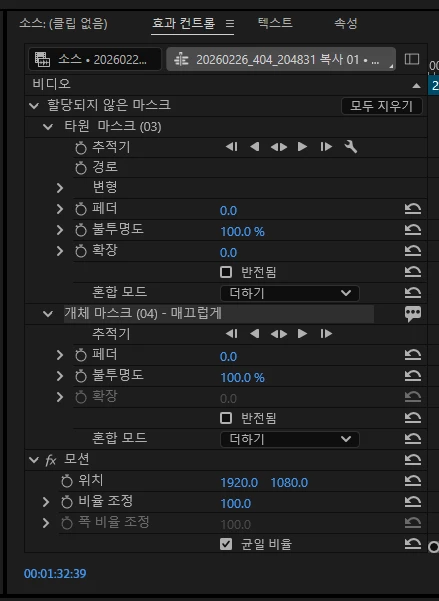
현재 같은 클립에서:

  • 일반 마스크(타원/펜툴 마스크)는 확장 옵션이 정상적으로 활성화됨

  • 그런데 AI 기반 개체 마스크(Object Mask)확장 항목이 회색으로 비활성화되어 조절이 불가능합니다.

첨부 이미지처럼 일반 마스크는 확장 값 변경이 가능한 상태인데, 개체 마스크에서는 비활성화되어 있습니다.

확인한 내용:

  • 페더 / 불투명도는 정상 작동

  • 마스크 추적도 가능

  • 일반 마스크에서는 확장 사용 가능

  • 오직 개체 마스크에서만 확장 비활성화

사용 환경:

  • Premiere Pro 26.22

  • Windows 10

    2 replies

    Community Manager
    June 5, 2026

    Hello there,

    Thanks for the report. What you're seeing is expected behavior. The Expand control is currently not available for AI-based Object Masks, which is why the option appears grayed out. Traditional masks (Ellipse, Rectangle, Pen Tool) support the Expand parameter, but Object Masks use a different masking technology and do not currently provide this control.

    If you'd like to adjust the mask boundary, please submit a feature request so the team can consider adding Expand support for Object Masks in a future release.


    Thanks,

    Kevin

    c.pfaffenbichler
    Community Expert
    Community Expert
    May 29, 2026

    You seem to be referring to »Premiere Pro 26.22«, this is a Photoshop Forum, you may want to try over on 

    https://community.adobe.com/p/premiere