
Inspiring
April 15, 2019
Answered

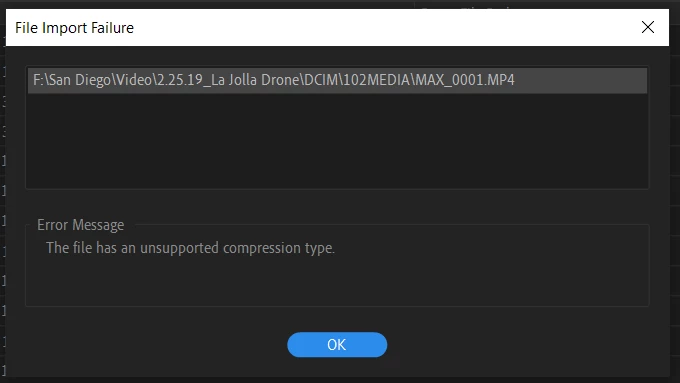
The file has an unsupported compression type. -- Premiere 13.1_h.265, .mp4 files_Autel Evo
  • April 15, 2019
  • 4 replies
  • 23846 views

I fixed this before by altering the file type to .mp4. Now I continue to have this issue with files that are verified intact and undamaged. Please help me find a permanent solution.

Thanks for your help.

Windows 10_April 9, 2019—KB4493509 (OS Build 17763.437)

Nvidia Driver 425.31

Correct answer michaelg919

From the title: Autel Evo, .mp4, h.265 (I believe this makes it hvec)

I have many clips from this drone that work without an issue. Other clips will import/read in premiere only intermittently with this message.

As I said I verified all files are intact and undamaged.

4 replies

Participant
April 7, 2024

I am having the same issue, from what I can tell this is related to permissions using specific hard drives.   If you transfer the file to another hard drive it will import without any additional work, however it doesn't solve the problem that Premier is unable to access certain drives with no reason given for why or how.

R Neil Haugen
Legend
April 7, 2024

Drive permissions is always an OS thing. You need to check the permissions for that drive, and at times, that folder tree.

Everyone's mileage always varies ...
Ann Bens
Community Expert
Community Expert
October 3, 2019

I Can't Explain

We try to avoid recommending transcoding as people want to use the original.

Participant
October 3, 2019

Hey! In case anyone has this problem again, I THINK I cracked it. I didn't see this solution in my brief skim of the replies.


My file was getting that error screen BUT it was still totally playable in Quicktime, so I just exported it through Quicktime, named it differently, and BOOM! Suddenly Adobe could recognize it. But call me The Who because "I Can't Explain." **High 5's Self**

Le Dr0ne
Participant
November 28, 2019

Thanks for sharing this idea it totally works.


You're a genius!

R Neil Haugen
Legend
April 16, 2019

What created the media ... what's the format/codec involved?

Neil

Everyone's mileage always varies ...
michaelg919AuthorCorrect answer
Inspiring
April 16, 2019

From the title: Autel Evo, .mp4, h.265 (I believe this makes it hvec)

I have many clips from this drone that work without an issue. Other clips will import/read in premiere only intermittently with this message.

As I said I verified all files are intact and undamaged.

R Neil Haugen
Legend
April 16, 2019

Is there a difference in frame-rate or size on the ones that work and don't? This isn't a rig I've heard of before, so ... not much 'experience' with troubles users might have.

Are you importing via the Media browser in Pr, right-click/Import in file manager ... what?

What kind of media/connections are the files on when used in computer?

Neil

Everyone's mileage always varies ...