
"The importer reported a generic error" in linking files for feature film - Is this a file path issue?
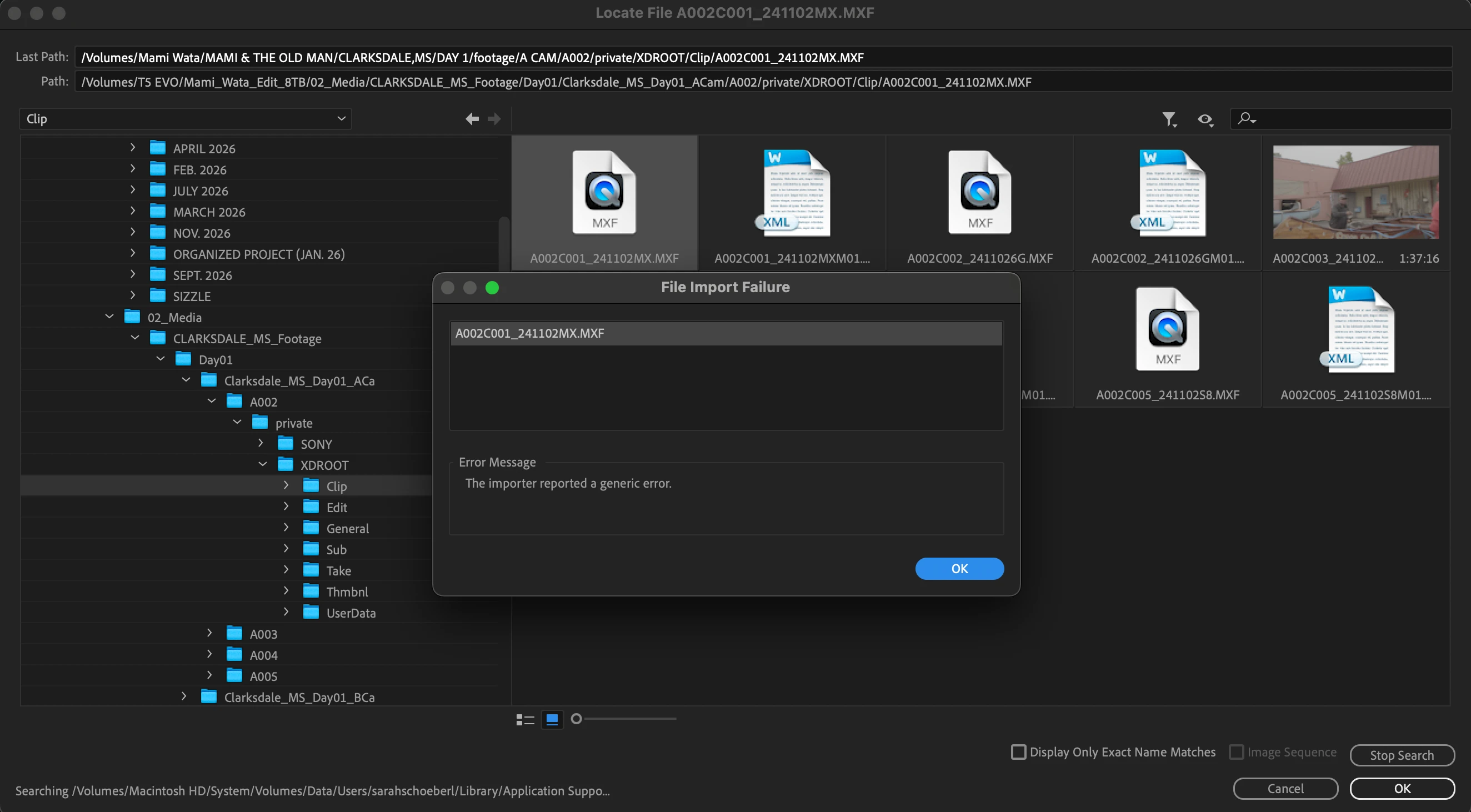
I am currently working on a feature film with around 6TB of footage. There is a separate section of the film that we worked on last year in its own separate Premiere Pro project file. When trying to open this project file now, the footage we have (let’s call it “Clarksdale location”) is not linking: “The importer reported a generic error”.
All of the footage attributed to this project file has been included in our new master external hard drive - a Samsung T5 EVO. We have a master project file we are working on with other footage, and this “Clarksdale location” footage can be opened and worked on perfectly fine in the master project file.
The issue arises when trying to open the old project file using this new hard drive, even though the file types and names are the exact same.
We have everything we need to open it, all “Clarksdale location” footage is there in the hard drive, with the same file names and types. Both the old project file and the master project file are the same version of Premiere Pro (version 24.3.0), but the import error keeps arising. I can locate them and the media browser recognizes them, but it does not link or “import”. I've attached a screenshot for reference. You can see there are many subfolders, but that doesn't impact this footage from being read in the master project file.
What solutions do you propose? I tried clearing media cache, making a new copy of the project file (and also to a new location), moving a .MFX file to a new file location like desktop and downloads to re-import, but it keeps coming up.
Thank you for reading and hope we can resolve this asap!
 AdChoices