
mrBeep
Known Participant
August 16, 2022
Answered

The new file import dialog window is highly unusable.

  • August 16, 2022
  • 3 replies
  • 547 views

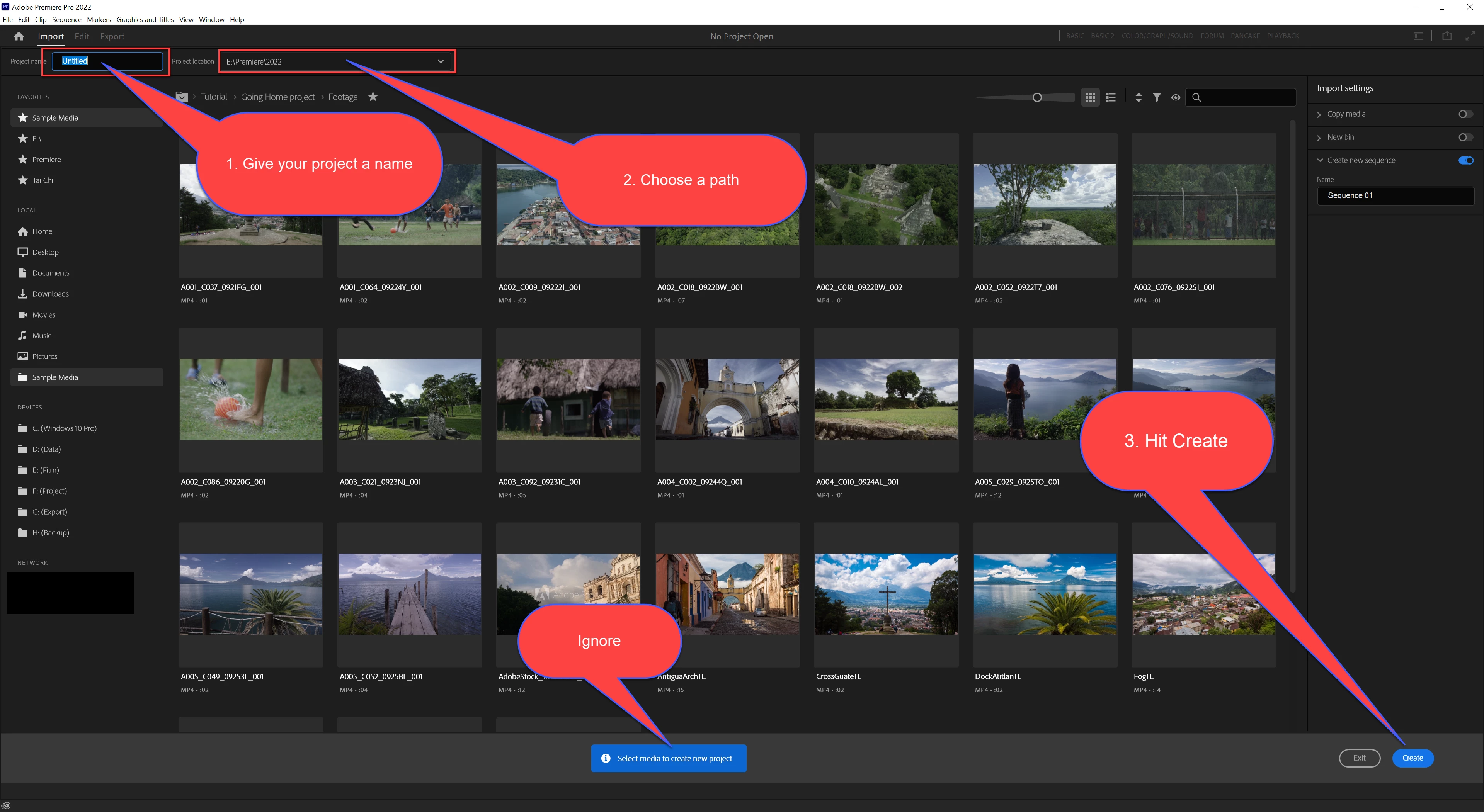
New file import dialog window introduced in some sub 22.x version is highly unusable. I can import files 4 times faster using system file dialog box. Please make the new workflow optional and don't spoil the something that worked for years. If you want to make peoples' life better you are in a very bad direction.
This topic has been closed for replies.
Correct answer Ann Bens

You can skip the most parts.

Name project, name path and hit OK.


3 replies

Participating Frequently
December 10, 2023

I totally agree!
I'm so glad to hear this polite conversation! Can please remind me who is paying money for what they think is right for us?
This import window needs to be fixed with the ability to browse for media file locations and more sorting media file options. (I see that the separate files are mixed with folders.)
I believe that this "Now-How" is not as complicated as Artificial intelligence (AI)...

R Neil Haugen
Legend
December 10, 2023

The devs say the Import Page may get slight mods, but not to match the MediaBrowser or in the Project Panel, the Import function.


As they "instruct" us, all three have different capabilities, and inherently then a specific suitability for different workflows.


Karl Soule recently noted some uses of the Import page that are useful when adding media to a project. Which is a use I hadn't thought of, but would actually be useful.


So ... maybe, I'll actually start using it some.

Everyone's mileage always varies ...
Kevin-Monahan
Community Manager
Community Manager
December 10, 2023

Hey Neil,

Where did you see Karl's commentary on that? I'd like to surface those tips.


Thanks,
Kevin

Kevin Monahan - Sr. Community & Engagement Strategist – Pro Video and Audio
R Neil Haugen
Legend
August 16, 2022

Ann's post is correct. They created the new page as far as they were concerned as a replacement for the old new project dialog. Most experienced users simply ignored it, typed a Name, selected Location, clicked Create.


We didn't use all the other location options more than maybe once, right?


So they thought we would obviously just do that with the new 'page' thing. Well, it ain't so obvious to most users as it was expected to be, is it?


Like Ann says ... Name, Location, Create. Then your project opens, you build the structure via Project or MediaBrowser panels as always.


The new page is for things like newsroom use, where an editor might get 8-20 "stories" dumped on them for quick processing. Each story has a single folder with all the talking head/b-roll media in it. This "import" page is slick for that kind of use.


Not for most of us though.


Neil

Everyone's mileage always varies ...
mrBeep
mrBeepAuthor
Known Participant
August 16, 2022

Thanks for the explanation! That makes a lot more sense now than before. This Import button was quite confusing at start.

R Neil Haugen
Legend
August 16, 2022

Yea, it certainly is. And while I can see it's usefulness for certain workflow needs ... I wish at least that the Create button was next to Location drop down. Or that a simple tab/enter tap would invoke it.


Sigh.


Neil

Everyone's mileage always varies ...
Ann Bens
Community Expert
Ann BensCommunity ExpertCorrect answer
Community Expert
August 16, 2022

You can skip the most parts.

Name project, name path and hit OK.