



Enthusiastic_teacher22cf
Participant
Nov 9, 2026 6:23 PM UTC
Answered

"The project was saved in a newer version of premiere pro and cannot be opened in this version." despite the fact theres no more updates and Ive used this file today on this same version

I have this project that had to be upgraded to the latest premiere pro version just today, didn’t give any issues whatsoever at the time.

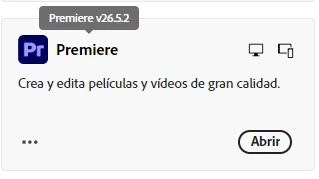
Had to change pcs, and so I took my project to the next one, and it said that it was saved in a newer version. “Fine, maybe this pc doesnt have premiere up to date” and so I installed the latest version (which, at the time of writing this, is version 26.5.2) and tried again just to be met with the same text box. I tried even uninstalling Premiere altogether and reinstalling it, also to no avail.

Unsure what to do, because I urgently need to be able to access this project, I even tried on another pc thinking maybe it was just the one I was on (it was not, it gave me the exact same message)
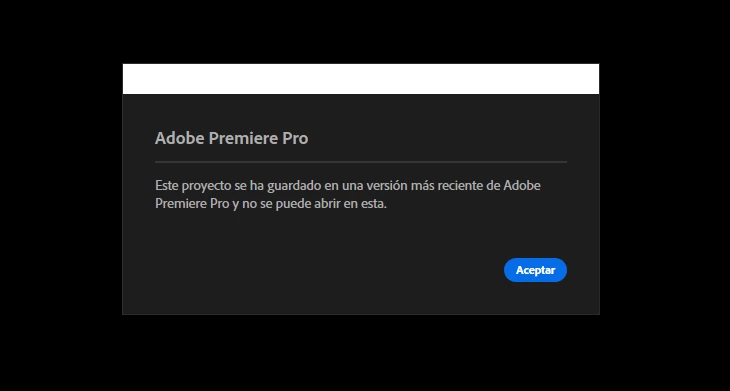
"The project was saved in a newer version of premiere pro and cannot be opened in this version."
Showing program version up to date + lack of updates available


    Enthusiastic_teacher22cf
    Participant
    Nov 9, 2026 7:18 PM UTC

    I figured it out!! So sorry to cause issues, I went to check and for some reason the pc i was on at first got the new rollout of v27 earlier than all the others and I hadnt even noticed. All the rest are still stuck in 26.5.2 but it just so happened that one had gotten the update TvT

    Thank you so much for the quick reply nonetheless <3

    4 replies

    KatieToo
    Community Manager
    Community Manager
    Nov 9, 2026 6:54 PM UTC

    Hi there ​@Enthusiastic_teacher22cf 

    Thanks for stopping by the Premiere forums, giving us those helpful details about your Project opening issue and including the two screenshots. The first I do see that saying “saved in a newer version” message, and with the second confirming Premiere Pro 26.5.2 installed in Creative Cloud (but the question is… did it also open it in that version or not?)

    One thing worth checking: could the project be opening in a different Premiere version installation than the one you updated? More than one version can be installed at once, and the Creative Cloud screenshot doesn’t show which version actually opened the project, but you can certainly check that on the app or open Premiere itself and directly get the version/build. See below.

    Here’s a quick test to try. On the second computer, could you launch Premiere from Creative Cloud, check the version/build using Help > About Premiere or Premiere > About Premiere. Once confirmed you’re in v26.5.2, use File > Open to open the transferred project? Does it still give the same message and does that computer still happen to have another Premiere version like v25 older installed or even Beta installed on either that it could be defaulting with? Beta updates pretty regularly so I could certainly see that still needing an update if so, for example.

    If possible, could you check the exact version/build of Premiere on the original computer too, and whether that computer can still open the same transferred project file?

    Do you know if the project also contains any After Effects Dynamic Link compositions, and which Premiere/After Effects versions were used and if they were matching versions? That should help us tell whether this is a version/launch mismatch or something specific to the project itself possibly.

    Sorry about the troubles with this, and we hope to help!
    Katie

    Translate
    Enthusiastic_teacher22cf
    Enthusiastic_teacher22cfAuthorCorrect answer
    Participant
    Nov 9, 2026 7:18 PM UTC

    I figured it out!! So sorry to cause issues, I went to check and for some reason the pc i was on at first got the new rollout of v27 earlier than all the others and I hadnt even noticed. All the rest are still stuck in 26.5.2 but it just so happened that one had gotten the update TvT

    Thank you so much for the quick reply nonetheless <3

    Translate
    KatieToo
    Community Manager
    Community Manager
    Nov 9, 2026 7:27 PM UTC

    ​@Enthusiastic_teacher22cf Ah-ha, sneaky v27 rolling updates! So glad you were able to get that figured out and now have things working. Really appreciate you coming back here and updating us what happened with that, too. :) 

    We’ll mark that as best answer in case anybody else has something like that happen soon.

    Thanks again for your report and updating to help others out!
    Katie

    Translate
    Peru Bob
    Community Expert
    Community Expert
    Nov 9, 2026 6:39 PM UTC

    Do you have any After Effects dynamic links in the project?

    Translate