

Inspiring
September 9, 2026
Question

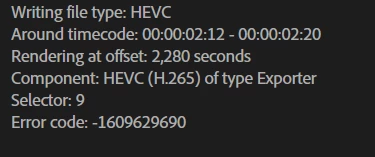
The render stops within the first few seconds. PP & ME

  • September 9, 2026
  • 4 replies
  • 47 views

I updated and restarted everything I could update and restart. 

just an endless wait.  This error rarely occurs, but it does happen


    4 replies

    Community Expert
    September 11, 2026

    try to delete render files from sequence.

    if you try to export to something like H.264 or QuickTime Cinefrom does the same happen?

    Inspiring
    September 13, 2026

    I need this file. It has always worked in this project. Nest isn't helping.

    Intel Core i7-14700K 3.4GHz/33MB s1700 BOX MSI MAG Z790 Tomahawk Max Kingston Fury DDR5-6400 65536MB PC5-51200 be quiet! MSI PCI-Ex GeForce RTX 5070 Ti Gaming Trio OC 16GB GDDR7 SSD Samsung 990 Pro 2TB M.2 PCIe 4.0 x4 NVMe 2.0 V-NAND 3bit MLC SSD Samsung 990 Pro 1TB M.2 PCIe 4.0 x4 NVMe 2.0 V-NAND 3bit MLC Toshiba MG Series Enterprise 20TB 7200rpm 512MB MG10ACA20TE 3.5 SATA III Windows 11 Pro 25H2
    R Neil Haugen
    Legend
    September 9, 2026

    See the timecode listed? That normally means there’s something there that is ‘off’. Go to that timecode and rebuild that section of the timeline.

    Everyone's mileage always varies ...
    Inspiring
    September 13, 2026

    It's just a regular MOV file. I've never had any problems with it; I've been using it in this project for a long time. Why did it stop working? It worked for 3 months, and then suddenly stopped. This is an Adobe issue.

    Intel Core i7-14700K 3.4GHz/33MB s1700 BOX MSI MAG Z790 Tomahawk Max Kingston Fury DDR5-6400 65536MB PC5-51200 be quiet! MSI PCI-Ex GeForce RTX 5070 Ti Gaming Trio OC 16GB GDDR7 SSD Samsung 990 Pro 2TB M.2 PCIe 4.0 x4 NVMe 2.0 V-NAND 3bit MLC SSD Samsung 990 Pro 1TB M.2 PCIe 4.0 x4 NVMe 2.0 V-NAND 3bit MLC Toshiba MG Series Enterprise 20TB 7200rpm 512MB MG10ACA20TE 3.5 SATA III Windows 11 Pro 25H2
