


Participating Frequently
September 18, 2026

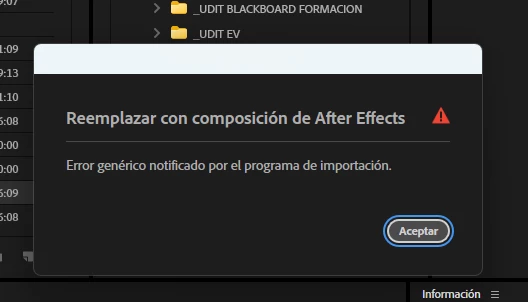
The "Replace with After Effects Composition" feature isn't working fine in the new version of Premiere (26.5.1)
  • September 18, 2026
  • 3 replies
  • 42 views

The "Replace with After Effects Composition" feature isn't working in the new version of Premiere (26.5.1) with open projects from previous versions (26.5). A "generic error reported by the exporter" message appears. After Effects does create the composition, but the clips aren't visible—they appear black—and the linked composition isn't created neither in Premiere proyect pannel nor in the timeline. Is this an issue with version 26.5.1? Has anyone managed to fix it? It works fine with completely new projects in this version; the problem only occurs with projects started in an earlier version (even if it's just a minor update, like going from 26.5 to 26.5.1).

Thanks

3 replies

Community Expert
September 18, 2026

Please make sure that both apps have the most recent version installed.

GSF0865Author
Participating Frequently
September 19, 2026

Of course, the Premiere, After Effects and Media Encoder instaled versions are the last avalilable versions in my Creative Cloud (PPro 26.5.1. AE 26.5, ME 26.5). As i said in my previous post, Dynamic Link is working fine with new proyects in 26.5.1, or new sequences created in older version proyects when you open a new sequence, but not with previous sequences already created in this previous version (26.5). Should i try to downgrade PPro to v. 26.5 until AE or ME update to a 26.5.1 version for the dynamic link to work properly?

GSF0865Author
Participating Frequently
September 22, 2026

Any thoughts about this?