



ohmypro
Known Participant
February 27, 2026
Question

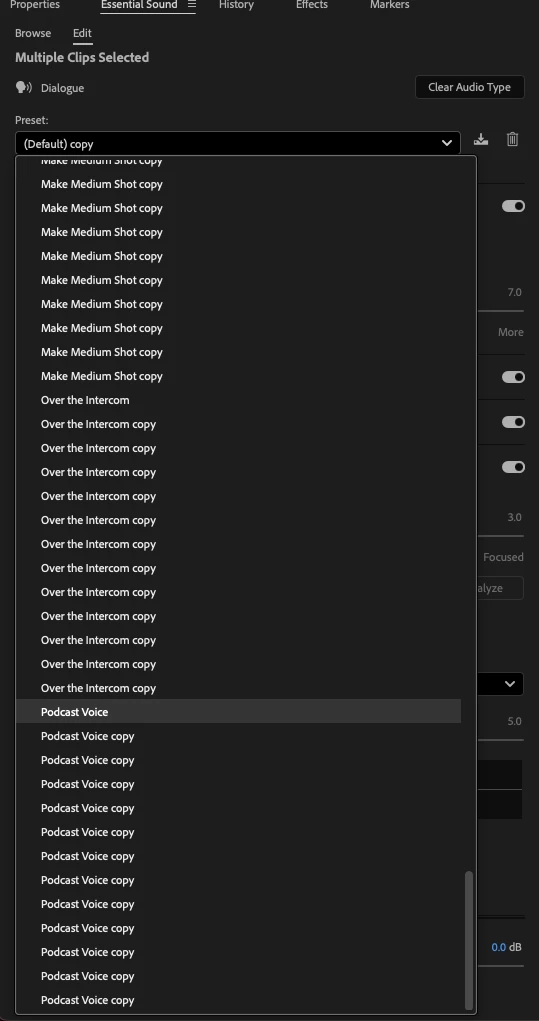
There are unexpected duplicate presets in my essential sounds panel.

  • February 27, 2026
  • 2 replies
  • 28 views

I attempted to post this to questions, but apparently it should be a bug report? The community expert told me I posted in the wrong forum, but didn’t tell me where it belongs.

At any rate, I have a gazillion extra preset copies in my essential sounds panel. I haven’t the foggiest idea how they got there. I can delete them one by one, but it would literally take me the whole day.  How can I resolve this on the finder level?


    2 replies

    Community Manager
    February 27, 2026

    Hi ​@ohmypro

    Did ​​​​​@Peru Bob’s the info helping you get that sorted?   A few follow-up questions to understand why this might have happened:

    • Did you ever import or sync Essential Sound presets from another machine or project?

    • Have you used any backup/restore tools or migrated settings recently?

    • Do the extra copies have identical names, or do they show version numbers or timestamps?

    • Are they appearing only in a specific workspace or across all projects?

    I hope you were able to resolve it.  Let us know!

    Peru Bob
    Community Expert
    Community Expert
    February 27, 2026

    On macOS, Adobe Premiere Pro Essential Sound presets are stored in your user Library folder, typically located at: ~/Library/Application Support/Adobe/Premiere Pro/<version>/Profile-<username>/Settings/EssentialSound/Default/. Note that the ~/Library folder is hidden by default in macOS; access it by selecting "Go to Folder" in Finder and typing ~/Library


    Adobe +3

    Key Locations & Details:

    • Default Path: /Users/<yourusername>/Library/Preferences/Adobe/Premiere Pro/25.0/Profile-CreativeCloud-/Settings/EssentialSound/Default/dialog/.
    • Alternative/Older Versions: ~/Library/Preferences/Adobe/Premiere Pro/11.0/Presets/EssentialSound/.
    • Essential Sound Panel: The panel itself can be found under Window > Essential Sound to apply these settings. 


      Adobe +3

    To access these files, you may need to open Finder, hold down the Option key, click the Go menu, and select Library to reveal the hidden folders. 

    from here:

    https://www.google.com/search?

    ohmypro
    ohmyproAuthor
    Known Participant
    February 28, 2026

    Thank you! I did google but for some reason I wasn’t getting what I was looking for.

    I found the Essential Sound Defoult  folder and moved it, then restarted Premiere and the folder regenerated with only what I needed.

    Much appreciated.

    Peru Bob
    Community Expert
    Community Expert
    February 28, 2026

    You’re welcome.

    Glad it’s fixed.