Inspiring
January 24, 2024
Answered

Time Remapping Made Easier?

  • January 24, 2024
  • 1 reply
  • 334 views

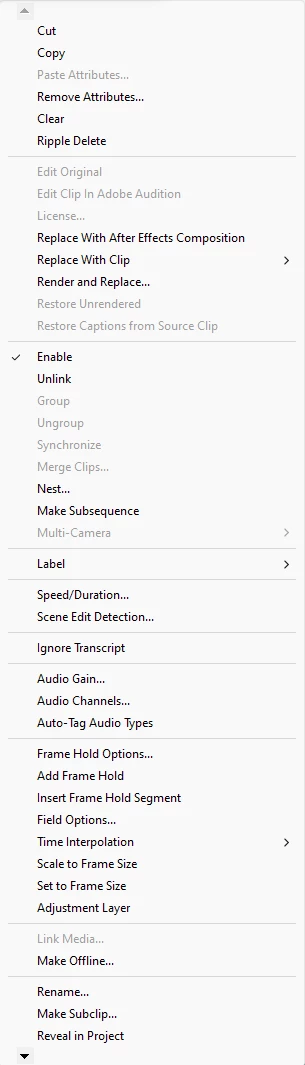
Please see attached for reference. I have some projects where i need to enable time remapping for speed ramps for many clips and the options cut off at the bottom and i have to click the arrow key to get to it everytime. Is there any easier or better way of doing this other than through the effects controls?
 

This topic has been closed for replies.
Correct answer Kevin J. Monahan Jr.

Hi @John34495747l9tu,

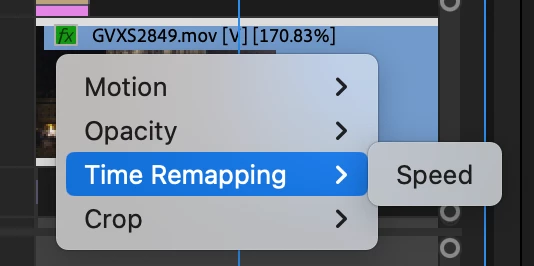
Thanks for the question. I think I understand what you are looking for. Try this: right-click on the FX badge on any clip in the Timeline and you can have this option.


I hope the advice helps. I apologize for any frustration you encountered. Take care.


Thanks,
Kevin

1 reply

Kevin J. Monahan Jr.
Kevin J. Monahan Jr.Correct answer
Legend
January 24, 2024

Hi @John34495747l9tu,

Thanks for the question. I think I understand what you are looking for. Try this: right-click on the FX badge on any clip in the Timeline and you can have this option.


I hope the advice helps. I apologize for any frustration you encountered. Take care.


Thanks,
Kevin

Kevin Monahan - Sr. Community and Engagement Strategist – Adobe Pro Video and Audio
Inspiring
January 25, 2024

Kevin, thank you for this. I have been spending so much extra time clicking the down arrows to get to time remapping so I appreciate it.