Inspiring
May 6, 2018
Answered

Time remapping speed line to 0

  • May 6, 2018
  • 2 replies
  • 697 views

How to set time remapping speed line to 0? I can not drag the line below 1%.

    This topic has been closed for replies.
    Correct answer Ann Bens

    Control + alt + drag the time remap keyframe to the right for a freeze frame.

    Freeze frame will show with vertical lines at the top and keyframes will be squared on the inside.
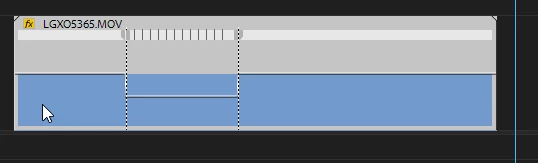
    2 replies

    Ann Bens
    Community Expert
    Ann BensCommunity ExpertCorrect answer
    Community Expert
    May 6, 2018

    Control + alt + drag the time remap keyframe to the right for a freeze frame.

    Freeze frame will show with vertical lines at the top and keyframes will be squared on the inside.

    JupersAuthor
    Inspiring
    May 6, 2018

    Meg The Dog, Add Frame Hold shows wrong frame if you have speed animation before.

    Ann Bens​, You are the best!

    Do you know more speed ramp tricks? I'm very interested to know is it possible to copy several speed keyframes from one place of the clip to another?

    Inspiring
    May 6, 2018

    Try it. 1% speed is a freeze frame.

    MtD

    EDIT:  Sorry, the above may be confusing. What I meant was if you slow the speed to 1%, it will ramp down to a freeze frame. To make that freeze frame run for an indefinite length, place the playhead on one of the (frozen) 1% frames and go to the menu  Clip > Video Options > Add Frame Hold.