Participant
July 7, 2022
Answered

Time values

  • July 7, 2022
  • 2 replies
  • 1148 views

Before I buy another video editing program I have a question.

I imported some video into Win Movie Maker.  

Time is displayed as HH:MM:SS.DD where HH is hours, MM is minutes, SS is integer seconds, and DD is decimal seconds.
There are 60 minutes in an hour, 60 seconds in a minute, and 100 decimal seconds in one second.

Movie Maker doesn't display 100 decimal seconds before changing the second value. It displays 20 decimal seconds before changing the second value.

When the decimal seconds increments from .19 seconds to .20 seconds the seconds value changes.
For example
00:00:20.17
00:00:20.18
00:00:20.19
00:00:21.00 Notice the change from 20 seconds to 21 seconds
00:00:21.01

Instead of a true counting of hundredths of seconds from .01 through .99 like this:
00:00:20.17
00:00:20.18
00:00:20.19
00:00:20.20 Didn't change from 20 to 21 seconds
00:00:20.21

The seconds change when the hundredths of seconds goes above .19. It's as though that while it is displaying .01 through .19 seconds it is actually .05 through .95 seconds.

Do the Adobe video editing programs accurately display decimal seconds?
This topic has been closed for replies.
Correct answer Ann Bens

Editing is done in frames as a clip is build up from frames.

Premiere and most professional editing programs show full seconds and frames.

(it does show milliseconds, but that is mostly used for audio)

00.01.05.19

0 hours, 1 minute, 5 second and 19 frames

The amount of frames shown depends on the framerate of the clip.

If your clip is said 60 frames per second, it will show a frame number between 0 and 59.


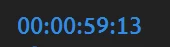
Screenshot shows my playhead is at 0 hours, 0 minutes, 59 seconds and 13 frames in a 25 frames per second timeline


2 replies

Ann Bens
Community Expert
Ann BensCommunity ExpertCorrect answer
Community Expert
July 7, 2022

Editing is done in frames as a clip is build up from frames.

Premiere and most professional editing programs show full seconds and frames.

(it does show milliseconds, but that is mostly used for audio)

00.01.05.19

0 hours, 1 minute, 5 second and 19 frames

The amount of frames shown depends on the framerate of the clip.

If your clip is said 60 frames per second, it will show a frame number between 0 and 59.


Screenshot shows my playhead is at 0 hours, 0 minutes, 59 seconds and 13 frames in a 25 frames per second timeline


Participant
July 7, 2022

After posting this I heard back from Win Movie Maker and they said the same thing.  The decimal seconds are not decimal seconds but frame count.

Thanks for confirming this.

Stan Jones
Community Expert
Community Expert
July 7, 2022

Ron, thanks for reporting back.


Stan


Stan Jones
Community Expert
Community Expert
July 7, 2022

Frames make up videos; Premiere Pro shows the frame number, not a decimal of a second. This tracks precisely which frame you are on.


You can add a timestamp that displays on the screen when the video is played, and that may show fractions of seconds. But it is a display, not the actual timeline timecode.


Stan