Danstable
Participant
August 2, 2017
Answered

Timecode and time remapping

  • August 2, 2017
  • 1 reply
  • 1089 views

I need to run a timer (minutes and seconds only ideally) on screen to show the viewer how long an operation takes.  It's a long operation and so I have time remapped some of it to make the end result more likely to hold the viewer's attention.

However I can't figure out how to get a timer on screen which stays faithful to real time, i.e. the time it took to film the operation.

Can anyone help me please?!

Thanks (from a newbie to the whole editing lark).
    This topic has been closed for replies.
    Correct answer Ashley7

    Danstable  wrote

    Thank you.  I don't have a timer, is this an 'effect' or something that I can download?

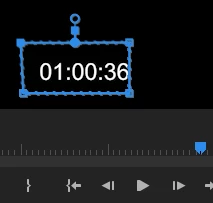
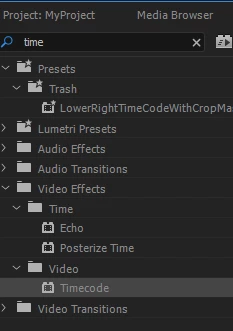
    For a quickie timer, I've used Premiere's timecode effect. I add a mask to that effect to block out the frame count... see screenshots below. You can set the timer to start at various points... from clip, generate, etc. I'm guessing there are awesome After Effects timers out there somewhere... you might search.

    1 reply

    Ann Bens
    Community Expert
    Community Expert
    August 2, 2017

    Assuming you have a timer,

    super impose over clip,

    nest,

    then do the timeremapping.

    No timer: best done in AE.

    Danstable
    DanstableAuthor
    Participant
    August 2, 2017

    Thank you.  I don't have a timer, is this an 'effect' or something that I can download?

    Ashley7Correct answer
    Legend
    August 2, 2017

    Danstable  wrote

    Thank you.  I don't have a timer, is this an 'effect' or something that I can download?

    For a quickie timer, I've used Premiere's timecode effect. I add a mask to that effect to block out the frame count... see screenshots below. You can set the timer to start at various points... from clip, generate, etc. I'm guessing there are awesome After Effects timers out there somewhere... you might search.