



Daniel Lange
Known Participant
February 23, 2026
Question

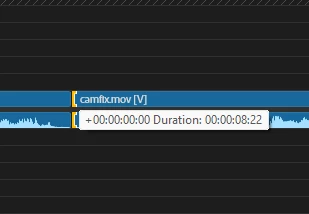
Timecode overlaps audio waveform

  • February 23, 2026
  • 2 replies
  • 39 views

I don’t know how this got through QA testing, but it’s practically impossible to use either rolling edit tool or ripple edit tool because of the gigantic timecode overlapping audio waveform

Please fix

A workaround is to have your pointer over the audio cut instead of the video cut

(Windows 11)
 

    2 replies

    Ann Bens
    Community Expert
    Community Expert
    February 24, 2026

    Overlapping occurs when grabbing the video section. 

    If grabbing the audio it will not overlap (but will overlap the clip beneath).

    Community Manager
    February 24, 2026

    Hi Daniel Lange,

    We’re sorry about the poor experience! On my end, the tooltip doesn’t overlap the clip being trimmed. Could you please confirm the version of Premiere you are using & if this is happening with any specific project/sequence? We will get it checked.

    Thanks,
    Sumeet

    Daniel Lange
    Known Participant
    February 24, 2026

    Hi Sumeet, I’ve attached a video showcasing said issue - as Ann Bens points out, the same happens with me

    Here I made a complete new project using “standard” template and just imported a video file
    So it seem to happen regardless of project / sequence

    26.0.1 build 3