


blumooon
Inspiring
October 21, 2023
Question

Timeline cursor stops, video keeps going, then it jumps forward, stops, then jumps forward

  • October 21, 2023
  • 19 replies
  • 3103 views

This is never going to be resolved until they actually update what is wrong. So I just ahve this to say:


NEVER EVER EVER EVER UPDATE YOUR ADOBE PRODUCTS WHEN THEY FIRST COME OUT. PERIOD. YOU WILL REGRET IT.


On to the rest of the post:

Having weird, going to call it "lag" issues? I hope I can explain it better below.


When I am editing my videos, for some reason now the time line cursor will stop (I uploaded an image to show below, just in case I am not using the correct terminology). The video keeps playing. Then the cursor will jump to the time on the timeline and then stop again. Then it will continue to do it, it will stop for 3-5 seconds, then jump to the correct location.


It is very difficult to edit when you glance down at the cursor line thing in your timeline only to see it lagged or sitting at the wrong place in the video edit and you have to stop the video for it to "catch up."


Now before you say it is the files and the size, wtc, I wanted to remind you, this never happened before even with much more intense videos, and my rig is not to shabby:


i9-10920x

64GB RAM

RTX3080

WIN 10 Pro

Downgraded Premiere back to 23.6.0

Working in only 1080 60fps.


This only happened after I updated to the latest version. I since downgraded my version to the last working one and it is still doing it. Again never happened before, this week it worked perfectly. Just started yesterday after I updated the app.


Any help please?
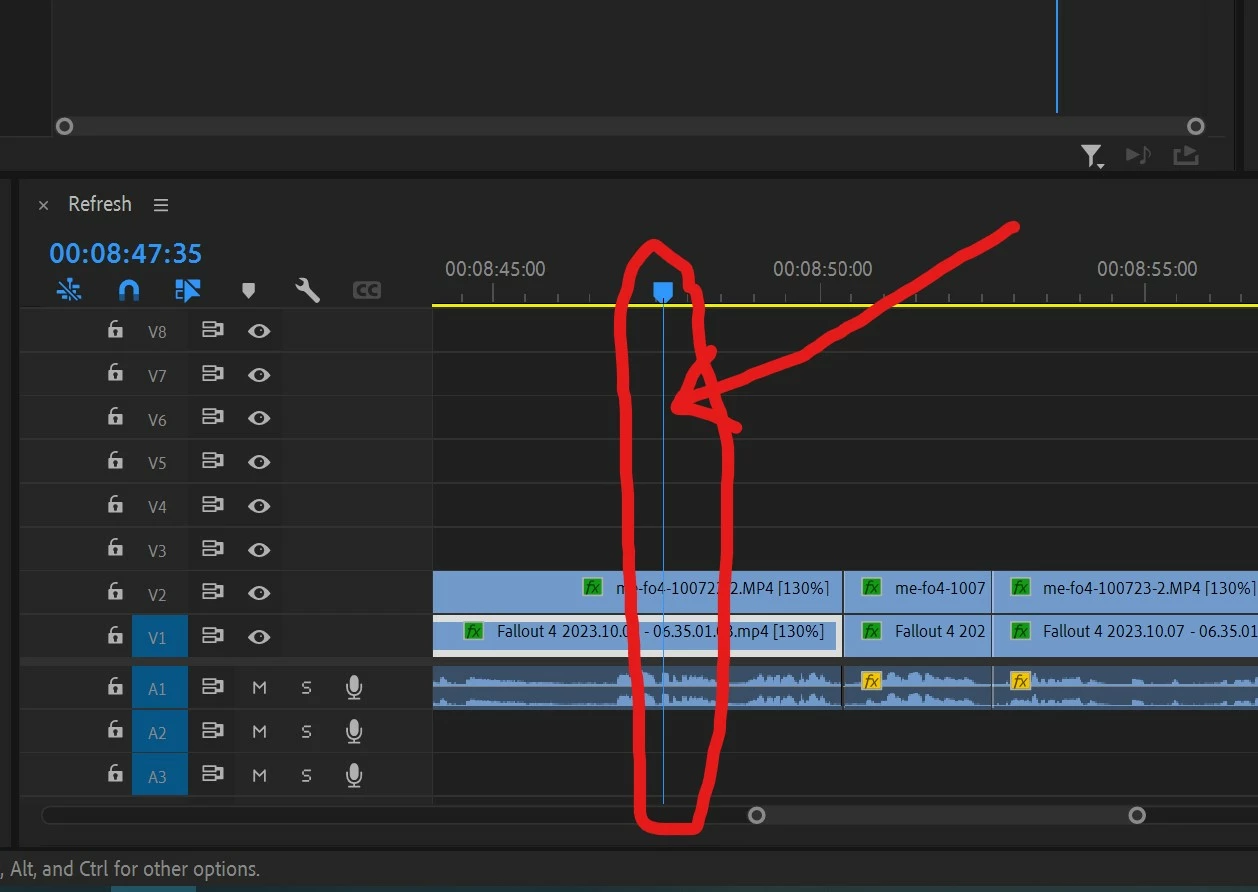
 

I made the mistake of updating my Adobe Products. I will save everyone from the "paying for a product that always has issues" mumbo jumbo that I want to spew, this is not the place to do that.

19 replies

blumooon
blumooonAuthor
Inspiring
October 27, 2023

I just wanted to stop by and thank you for giving it a go. It didn't end well this time, I cancelled my subscription, but just wanted to say thank you for helping.


EDIT: Well I didn't "cancel" my subscription, they offered me three free months and I took it just in case I need to export certain things to the "other" program I am using now. But I won't renew. Not that you really wanted to know but I told you anyways... lol.

Stan Jones
Community Expert
Community Expert
October 26, 2023

@blumooon,


Painful. Thanks for reporting back in detail.


@mstegner


Stan


blumooon
blumooonAuthor
Inspiring
October 26, 2023

I tried all that you suggested and to no avail. I also did the audio thing with the troubleshoot tech and it did nothing.


Thanks goes out for helping me out on this.


 BUT...


I did more research on the versions I had previous to this debacle. If that combo worked before there should be ZERO reason it wouldn't work again.


Premiere was easy, I rolled it back. Then looking at Nvidia it was NOT easy to find the last driver I had. So after 15 minutes or so I found it. You would think it would be easy to find, but I went to a 3rd party website to get the info. Thanks Nvidia! (Not)


So I rolled the graphics driver back to that version. I am confident enough to say, this was the exact setup I had before.


Guess what.


Now it worked the way it did before. At first it was stuttering again, a little anyways. But I realized it was "generating peak files" - and that is a good thing. Once it stopped. I was back to normal.


I decided I would work on my video a bit, and wouldn't you know it... out of nowhere, it started to happen again. The timeline stuttered. It stopped. But the video was still playing. I would make a cut and the program would freeze and the loading circle. I hoped it wasnt that... but alas, I am back to the same issues I was having before.


Now going on 6 hours of troubleshooting that I will never get back.


Apart from sour grapes, I will just have to say, Premiere is not a good program if I am having all these issues with it. Twice a year I have had altercations with it, and I think I have finally reached the end of my rope.


Yesterday I put everything in Resolve. Though the interface is very clunky, I maneuvered my way through 2-3 minutes of editing and not a stutter, not a stop, not a hesitation. It was smooth and the kicker was? I was on 100% resolution too.


I am in no way trying to promote another product, though it seems it is superior to Premiere right now. This is just to show you Premiere & ADobe has issues, and instead of making the best stable powerful program Adobe can, they put their time into nonsensical new features and design new programs literally no one uses.


Think this might be the last straw. Not what I wanted to be doing the past 2 weeks....


But another hard lesson. One that I want everyone to take away from this.


NEVER EVER EVER EVER UPDATE YOUR ADOBE PRODUCTS WHEN THEY FIRST COME OUT. PERIOD.


Again thank you everyone that helped! But I am off to save 25 dollars a month. Not too happy about it either. 😞


Community Manager
October 25, 2023

One thing you can try is to set "Preferences>Audio Hardware>Default Input..." dropdown to “No Input”.

Stan Jones
Community Expert
Community Expert
October 25, 2023

I saw your new post after I posted here.


I see that it may be a more general performance issue and that you improved the playhead performance itself. But far from what your system should be doing.


I like the Puget benchmarks for looking at performance issues and trying to understand what is working well and not.

https://www.pugetsystems.com/labs/articles/pugetbench-for-premiere-pro-1519/


But they do not appear to have a version for PR 24.0 yet.


Stan

blumooon
blumooonAuthor
Inspiring
October 25, 2023

First and foremost. Thank you! I will review what you have here and see if any of it can help.

Stan Jones
Community Expert
Community Expert
October 25, 2023

@blumooon,


Frustrating problem to be sure.


I have little to offer, but I'll give you my response.


You described the problem well. Playback of the video itself is smooth, the current time moves forward in small start/stops when it should be constantly changing, and the playhead start/stops in bigger steps. I think it is called the "playhead," but then you'll see references to the CTI - current time indicator as if they are the same thing.


Is the audio smooth?


I finally settled on "premiere pro "playhead" skips -jump" as a google search because "jump" results in MANY problems with the playhead "jumping" to the end, the beginning, etc. Your behavior is more like skipping, but unfortunately there are few hits there. The only match for the problem was on reddit, and I did not find the responses that helpful. https://www.reddit.com/r/editors/comments/zlzzzs/premiere_playhead_issue_choppiness/


This page at least mentioned playhead, but was about "lagging." It did include this: " If the playhead skips or jumps instead of moving smoothly along the timeline, it’s a sign that some frames have been dropped." https://blog.pcrisk.com/windows/13798-premiere-pro-lagging


I'd turn on the dropped frames indicator to see. (Program Monitor wrench -> Show dropped frame indicator. But the playback looks smooth, which makes this so puzzling.


Yes, I'd always consider video driver as an issue, but I'd expect more general problems than just the playhead.


Stan


blumooon
blumooonAuthor
Inspiring
October 22, 2023

Not to be "the guy" that bumps things, but I am still having issues. I guess this means I have to go directly to Adobe support. That is fine. It is just that this place usually can get to the bottom of things fairly quickly.


Would my problem have anything to do with a new Nvidia Driver?

blumooon
blumooonAuthor
Inspiring
October 21, 2023

Here is a quick Youtube video to show you what is going on: https://www.youtube.com/watch?v=WqyZ1jaRd1c


PS - I even downloaded that tool and all it said was my preferences might be corrupt. I deleted the preferences, got a new set and same thing. Not the problem.


PSS - Something else I noticed, that when I cut from the timeline, then snap the two clips together, thre is a long delay for it to do that. Like 10 seconds. I can't do anything, the program is frozen.


I know I keep updating this, but I am wasting my time trying to figure out what is happening. I replaced the video files with ones run through Handbrake and also re-rendered through Media encoder and I think it made it worse.


Tried a stand alone and it seemed to work a little better, but still having the same issue. Even with a 480p video.