

WaywardWizard
Inspiring
June 9, 2023
Answered

Timeline doesn't sync to real-life - Timecode Mismatched

  • June 9, 2023
  • 3 replies
  • 571 views

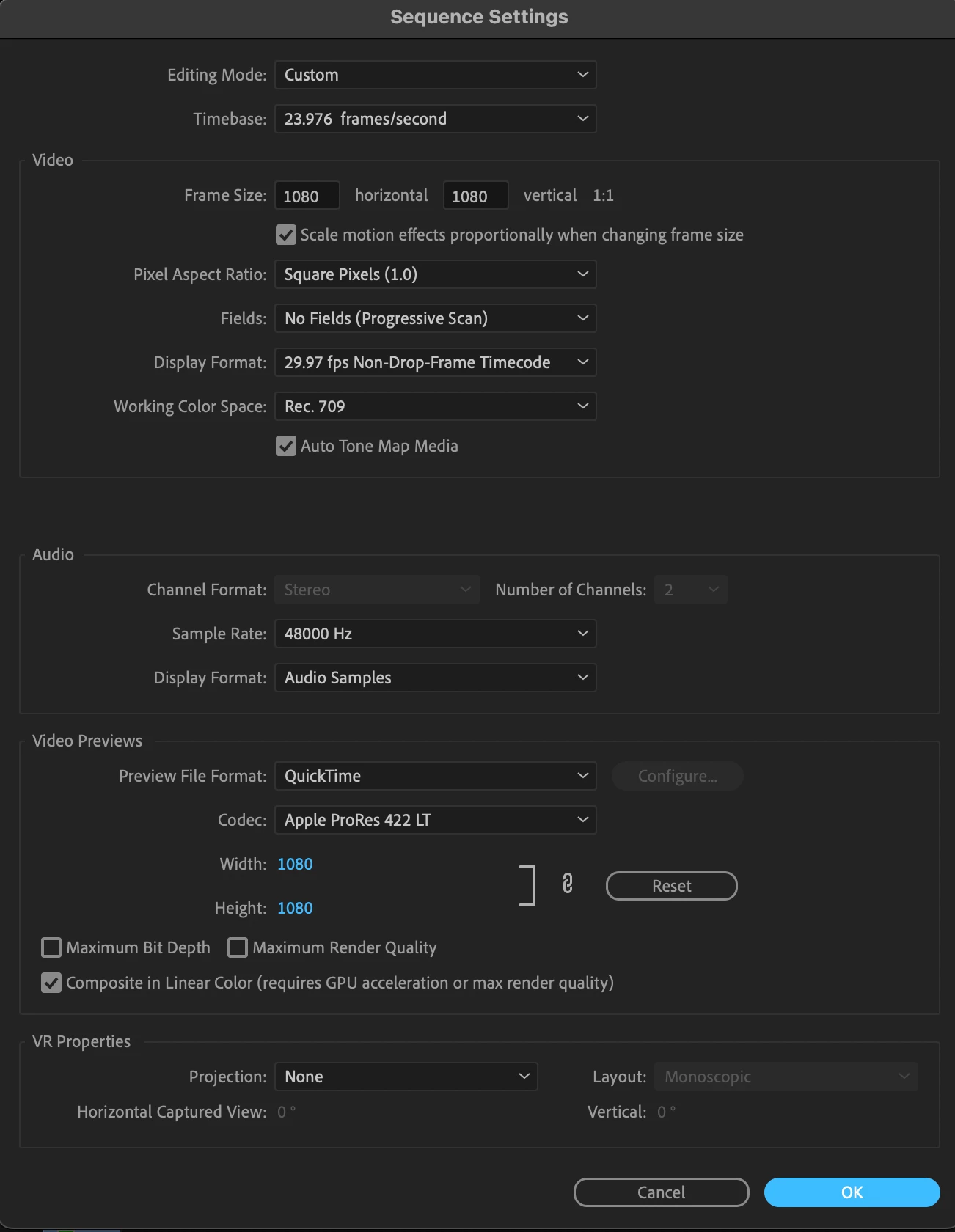
I've edited a video to be excatly 30 seconds in length, but when I export, the video is longer by about 7-8 seconds. There are no rogue clips or inaccuratly sized in and out points, no change in speed or pitch of the clips or music. The project and export are identical, except for the time. I've included a video to help illustrate. 


Mod note: Title changed slightly.

This topic has been closed for replies.
Correct answer smrpix

Set your display format (currently 29.97 fps non-drop frame) to match your actual timebase (23.976)

Basically, you're counting wrong -- and you'll have to shorten your piece.

3 replies

Participating Frequently
June 9, 2023

This happened to me once. I'm not sure what caused it. I might have created a sequence from a 29.97 clip, and then manually adjusted the Sequence Timebase to 23.976 forgetting to adjust the Display Format as well. In some cases it changes automatically but in others (like above) it doesn't.


A nice quality of life change would be to make the above consistant, or add a warning if there's a mismatch.

WaywardWizard
Inspiring
June 9, 2023

That's it! Thanks.


Why would this have changed. I've been editing for nearly a decade and haven't run into his before. Could it be caused by creating a sequence from footage my client sent over? I typically edit footage that I've captured, and that's the only difference I can think of.

smrpixCorrect answer
Participating Frequently
June 9, 2023

Set your display format (currently 29.97 fps non-drop frame) to match your actual timebase (23.976)

Basically, you're counting wrong -- and you'll have to shorten your piece.