Participant
August 7, 2020
Question

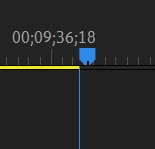
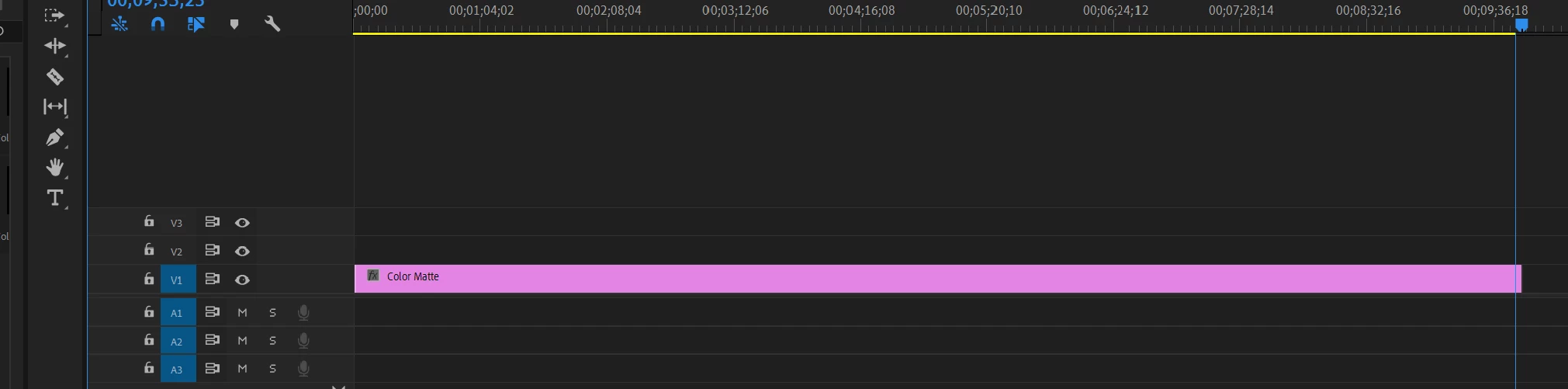
timeline indicator is not correct (error?)
  • August 7, 2020
  • 2 replies
  • 293 views


The indicator on the timeline is not exactly at the end


Recently, this problem has occurred and even if I re-installed Premier Pro, it did not resolve.  Look at the second picture. You can see that the line below the point is misaligned.


Please someone fix this problem.

This topic has been closed for replies.

2 replies

R Neil Haugen
Legend
August 7, 2020

I can't replicate here.


Neil

Everyone's mileage always varies ...
Kevin-Monahan
Community Manager
Community Manager
August 7, 2020

hyeongyuk,

Agree that is a wee bit strange, but probably nothing serious. You're zoomed in to the Timeline, what, 1000%? You're at the frame level there. 

How does it look in a new sequence? Even at an extreme zoom level you've got going on there. If you are still seeing it, you may want to look into resetting preferences. Do you know how to do that? If not, here's how.

Hope we can help.

Thanks,
Kevin

Kevin Monahan - Sr. Community and Engagement Strategist – Adobe Pro Video and Audio