austinb65812041
Participant
December 30, 2018
Answered

Timeline only counts up to the 0.23s and then starts at the next second.

  • December 30, 2018
  • 1 reply
  • 6568 views

My timeline in my videoplayback and source only counts up to 0.23s and then skips to the next second. (0.00-0.23 and then skips to 1.00s) This makes it impossible to add audio because it chops it up. Adding video seems to be fine which i think has something to do with the frames attached to the clip. Please help

    This topic has been closed for replies.
    Correct answer Meg The Dog

    The numerical display in the timeline is displaying timecode.

    The format of timecode is always Hours:Minutes:Seconds:Frames (HH;MM;SS;FF).

    The last two digits are frames, not portions of a second. The last two digits should always stop up counting 1 number before the frame rate of the timeline. The next number will be the start of the next second, and the frame count will revert to :00.

    Changing the frame rate of time line will have consequences. You normally would not want to have a different frame rate on the timeline than the frame rate of your source material, unless you a very specific reason to do so.

    The frame is the smallest single unit of video. You can only edit video at the frame points. There is no such thing as, for example, a 1/2 frame of video.

    If you need greater precision for editing audio, you can edit audio on the timeline at a higher temporal resolution than the video frame rate by clicking on the hamburger menu next to the Sequence name and from the drop down menu choosing Show Audio Time Units:
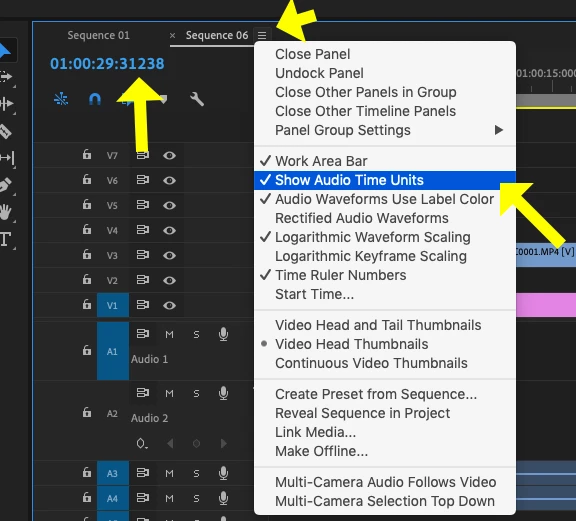
    Now the timeline will display in thousandths of a second, and the you can edit the audio a sub frame precision - but the video will always only be editable at the whole frame level.

    MtD

    1 reply

    Peru Bob
    Community Expert
    Community Expert
    December 30, 2018

    Is your sequence set for 24 frames/second?

    If so, it is counting 23 frames and the 24th frame is 1.00 seconds.

    austinb65812041
    Participant
    December 30, 2018

    Okay I set it to 60fps but now the timeline only goes up to the 0.60s before skipping to the next second.This problem reoccurs when I start a new project as well.

    Meg The DogCorrect answer
    Inspiring
    December 30, 2018

    The numerical display in the timeline is displaying timecode.

    The format of timecode is always Hours:Minutes:Seconds:Frames (HH;MM;SS;FF).

    The last two digits are frames, not portions of a second. The last two digits should always stop up counting 1 number before the frame rate of the timeline. The next number will be the start of the next second, and the frame count will revert to :00.

    Changing the frame rate of time line will have consequences. You normally would not want to have a different frame rate on the timeline than the frame rate of your source material, unless you a very specific reason to do so.

    The frame is the smallest single unit of video. You can only edit video at the frame points. There is no such thing as, for example, a 1/2 frame of video.

    If you need greater precision for editing audio, you can edit audio on the timeline at a higher temporal resolution than the video frame rate by clicking on the hamburger menu next to the Sequence name and from the drop down menu choosing Show Audio Time Units:

    Now the timeline will display in thousandths of a second, and the you can edit the audio a sub frame precision - but the video will always only be editable at the whole frame level.

    MtD