Inspiring
July 15, 2019
Answered

Timeline/Sequence Does Not Export. Hangs on encoding pop up.

  • July 15, 2019
  • 3 replies
  • 556 views

Hi,

I have a project with multiple sequences.


I have been working with this project since December and have not had this issue before.

Some sequences export just fine, but if they are the longer ones (30 minutes as oppose to 2 minutes) they do not export.

What i mean by that is the following:

The export window opens, as per normal.

I can choose whatever settings I like, as per normal.

I click export.

It then hangs on the encoding progressing bar pop up.
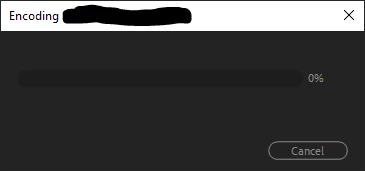
If I place in and out points on the timeline, even if its 10 seconds in duration, the same problem persists.

I have tried copying the sequence clips into a new sequence (i didn't just duplicate the sequence)

This also did not work.


If the entire project wouldn't export, i feel like that would make more sense.

I have tried clearing the media cache, and deleting render files, but still no luck.

Another thing to note, is that the sequences hang when i try to render the timeline, even small amounts of it.

I do not want to reinstall premiere as i DO NOT want to update to 13.1.3. Im currently in the middle of projects and that's just not a great idea.

Further to this, I have tried Queuing to AME but the same issue persists. It hangs during the encoding phase and nothing happens.

PC SPECS:

Processor Intel(R) Core(TM) i7-6900K CPU @ 3.20GHz, 3201 Mhz, 8 Core(s), 16 Logical Processor(s)

NVIDIA Quadro M4000

64 GB RAM

OS Name Microsoft Windows 10 Home

PREM 13.1.2

Thanks in advance for the help.

This topic has been closed for replies.
Correct answer Louis_Kleva Brands

UPDATE UPDATE

I have fixed the issue.

I broke the timeline down into chunks. Copied and pasted those sections into a new timeline.

After each chunk, i would attempt to export just that little bit. If it worked, i continued on adding the next chunk, checking for export, and so on.

I then came across a chunk which did not allow me to export. After further inspection, I found that one clip was "Media Pending". This did not make sense, so i located the clip and IT WAS CORRUPT.

How or why it became corrupt i do not know.

But this clip was not in the other smaller sequences that could be exported.

Luckily i had the clip stored in two locations, so I went to the other location, and copied it back onto my local drive, deleted the corrupt file, and relinked to this fresh one.


What do you know?! It exported with no issues.

The lesson here is watch and rewatch.

The lesson is also, shouldnt there be a pop up, or some notification if a file is exhibiting this issue? Much like the media offline, or the (relatively new) warp stabilizer notifications.

If a file is contsantly "pending" something is obviously wrong, but with a sequence with hundreds (if not thousands) of cuts. It would be helpful to just have a pop up with a timecode reference, instead of painstakingly going through it like I did.


BUT I'm freaking happy now so.

S'all good.

3 replies

Louis_Kleva BrandsAuthorCorrect answer
Inspiring
July 16, 2019

UPDATE UPDATE

I have fixed the issue.

I broke the timeline down into chunks. Copied and pasted those sections into a new timeline.

After each chunk, i would attempt to export just that little bit. If it worked, i continued on adding the next chunk, checking for export, and so on.

I then came across a chunk which did not allow me to export. After further inspection, I found that one clip was "Media Pending". This did not make sense, so i located the clip and IT WAS CORRUPT.

How or why it became corrupt i do not know.

But this clip was not in the other smaller sequences that could be exported.

Luckily i had the clip stored in two locations, so I went to the other location, and copied it back onto my local drive, deleted the corrupt file, and relinked to this fresh one.


What do you know?! It exported with no issues.

The lesson here is watch and rewatch.

The lesson is also, shouldnt there be a pop up, or some notification if a file is exhibiting this issue? Much like the media offline, or the (relatively new) warp stabilizer notifications.

If a file is contsantly "pending" something is obviously wrong, but with a sequence with hundreds (if not thousands) of cuts. It would be helpful to just have a pop up with a timecode reference, instead of painstakingly going through it like I did.


BUT I'm freaking happy now so.

S'all good.

Inspiring
July 16, 2019

UPDATE

I have contacted Adobe, and they have remotely accessed my comp.

Changed permissions, switched the location of the project file.

Reset Preferences.

Made sure my windows and Gcard are both 100% up to date.

BUT still the problem persists.

To recap:

I have a project with multiple sequences.

I have tried to export a longer sequence (30 minutes) and it hangs on the encoding part of the export.

I have tried to export only small 10 second sections of this sequence and still it happens.

I can, however export from the smaller sequences (2 minutes)

I have also tried duplicating the sequences i can export from, then copying and pasting the clips from the sequences i cant into there. But the issue still occurs.

PLEASE HELP.

Kevin J. Monahan Jr.
Legend
July 16, 2019

Hi,

It sounds like your computer system might be overwhelmed with too many tasks. Try exporting one sequence at a time. If that doesn't work, try exporting once sequence at at time using the following technique.

Try changing Sequence > Settings: Editing Mode > Custom

Change Preview File Format to QuickTime > ProRes 422

Render the Timeline until the entire timeline has a green line over it.

File > Export > Media

Change Format and Preset to QuickTime and ProRes 422

Check the "Use Previews" dialog box

Click Export

Use this master file to upload to YouTube or to use as a master to create H.264 copies.

This process is known as "smart rendering" and can help you export in most cases.

Thanks,
Kevin

Kevin Monahan - Sr. Community and Engagement Strategist – Adobe Pro Video and Audio
Inspiring
July 16, 2019

Sorry if i have confused the situation.

I am only trying to export one sequence at a time.

I'm not even doing anything else on the computer but that export.