
samuelh65354682
Participant
February 9, 2018
Answered

Titles showing up with checkerboard/transparent background

  • February 9, 2018
  • 1 reply
  • 4278 views

Not sure what I did, but in the past, if I opened/used the title tool to write/insert a title over an area with no footage, it would display in Premiere as text over black. 

Now, for some reason, the area with the title media itself is showing as a checkerboard/transparency.  I'm sure it's some preference or box that got unchecked. 

Titles with footage underneath display as expected.

What did I do?

Thanks
    This topic has been closed for replies.
    Correct answer Meg The Dog

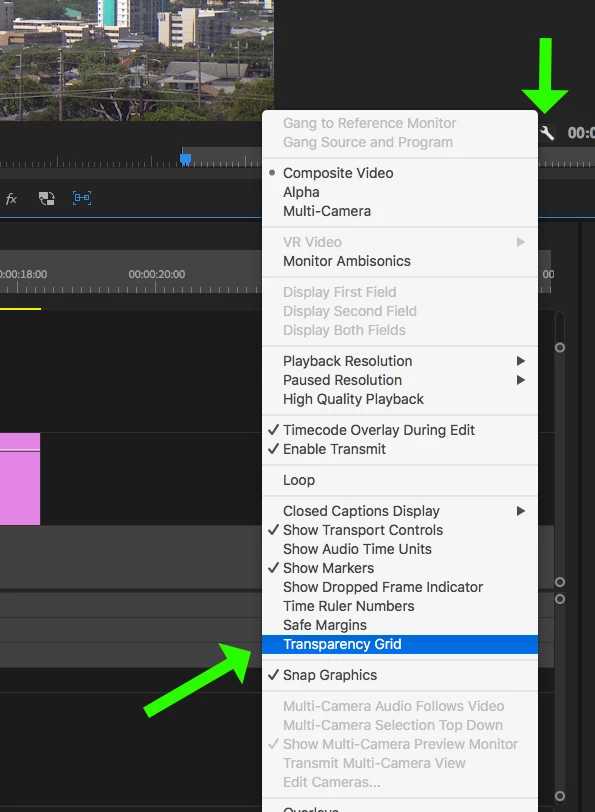
    In the Program Monitor, click on the wrench in the lower right corner and on the drop down menu, select Transparency Grid to toggle it off (uncheck it):

    MtD

    1 reply

    samuelh65354682
    Participant
    February 9, 2018

    I should add that something in general with the transparency got tweaked - any footage that is transparent is showing up with checkerboard instead of black, including opacity mask, even dissolves, where there are no black filler clips underneath.  I came over from FCP so I'm still learning my way around...

    thx!

    Meg The DogCorrect answer
    Inspiring
    February 9, 2018

    In the Program Monitor, click on the wrench in the lower right corner and on the drop down menu, select Transparency Grid to toggle it off (uncheck it):

    MtD

    samuelh65354682
    Participant
    February 9, 2018

    Thank you!

    I had been working with multicam in another project so I kept opening up that wrench menu - I must have hit transparency by mistake.