
Answered
Toggling between Scopes
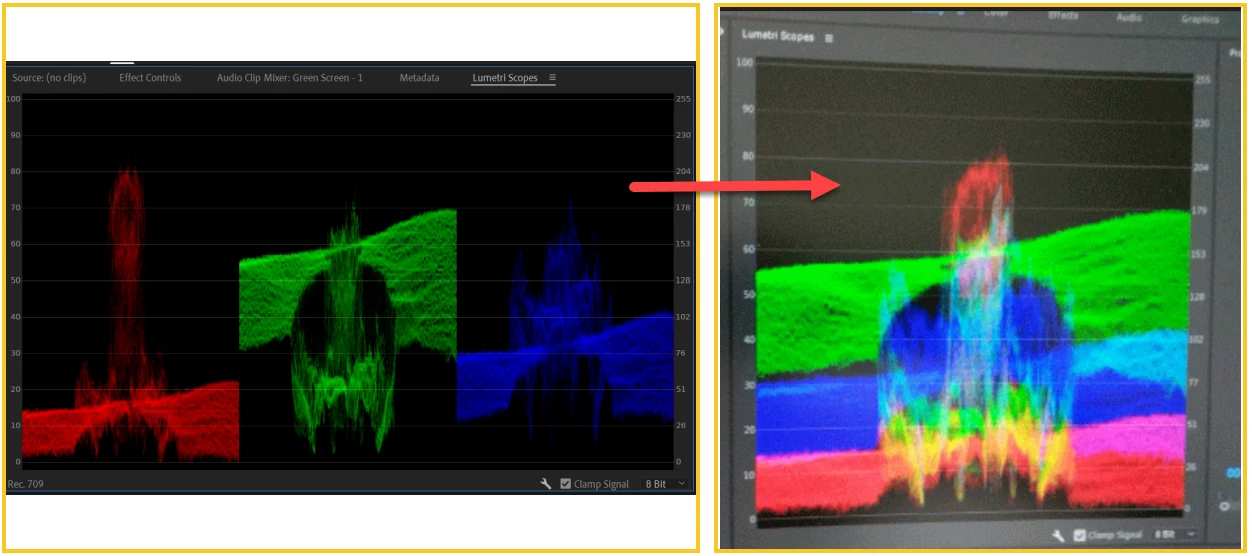
Second picture shows three different colors in the first picture is combined to get a one picture. Is there any toggling switch to do this?
[title edited by mod]

Second picture shows three different colors in the first picture is combined to get a one picture. Is there any toggling switch to do this?
[title edited by mod]
The first scope is a Parade, in RGB ... an RGB Parade. You see the image in three passes, the left side is the Red channel, middle is Green, right is Blue. And it's incredibly useful to see the image and compare for color balance at any one spot left to right in the image.
You can get something similar to the second one by adding a second scope, a Waveform. In several different forms. I tend to use the Waveform in YC no chroma, as a completely "clean" tonal look of the image.
Neil
Already have an account? Login
Enter your E-mail address. We'll send you an e-mail with instructions to reset your password.
 AdChoices