


Inspiring
October 15, 2026
Answered

Toolbar not available when I enlarge the sequence

Hi all - When I double click on the sequence name the timeline increase in size but I cannot see the toolbar to make edits. Is this something that I can change and if so how do I
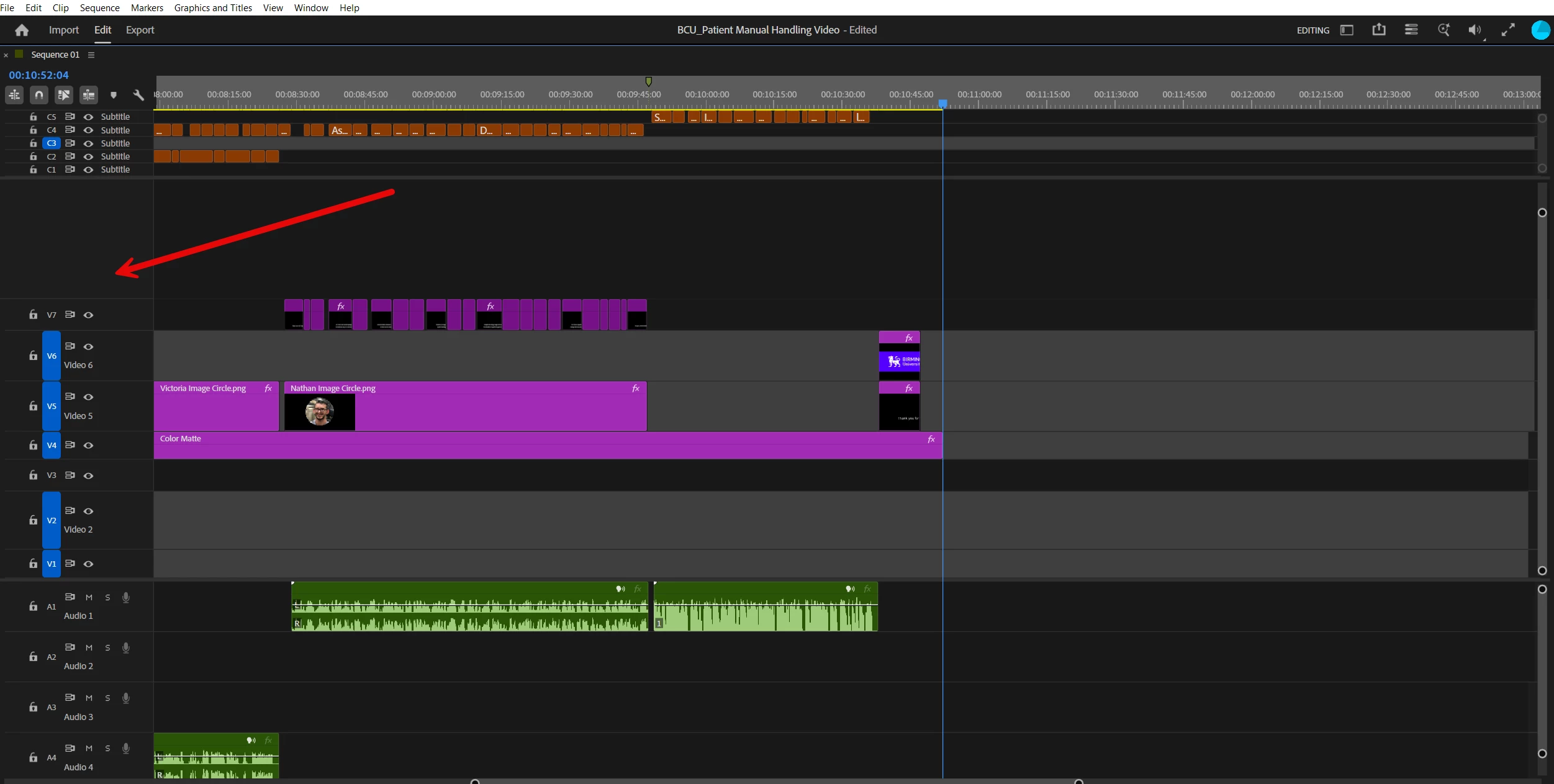
 do it. I have attached an image with an arrow. Thank you. Paul

    Ann Bens
    Ann BensCorrect answer
    Community Expert
    October 15, 2026

    If you mean these: 

    Reset workspace: window > workspaces > Reset to Saved workspace.

    8 replies

    Stellar_wanderlust89ce
    Participant
    October 17, 2026

    It sounds like your timeline panel may be maximized, which can hide other editing tools. Try double clicking the sequence name again to restore the normal workspace. You can also check the Window menu to reopen any missing panels or reset your workspace to its default layout. If the toolbar is still missing, make sure the editing application is not in full screen mode.

    This is also useful when editing downloaded TikTok videos. Once your timeline and toolbar are visible, you can easily trim clips, add transitions, adjust audio, and prepare videos for sharing. Keeping your editing workspace organized makes the process smoother, especially when working with several short clips in one project.

    Translate
    Community Expert
    October 17, 2026

    Another option is to split your single application window into multiple windows.

    This video walks through the process: https://www.youtube.com/watch?v=z06h7A77ZMw

    Translate
    PAUL129Author
    Inspiring
    October 17, 2026

    Thank you Paul. Great answer 👍

    Translate
    Ann Bens
    Community Expert
    Community Expert
    October 15, 2026

    That is correct: you need to make a video track first by adding a clip to the empty space. Then the tools will appear.

    Translate
    PAUL129Author
    Inspiring
    October 15, 2026

    Hi Ann, thank you so much for the prompt reply. There is already video clips in the timeline V5

    Translate
    Ann Bens
    Community Expert
    Ann BensCommunity ExpertCorrect answer
    Community Expert
    October 15, 2026

    If you mean these: 

    Reset workspace: window > workspaces > Reset to Saved workspace.

    Translate
