
Inspiring
Nov 12, 2026 12:31 AM UTC
Answered

Tracking is not working in 27

Windows 11 (Lastest update)

Asus ProArt Desktop with Core i9 and 64 GB memory


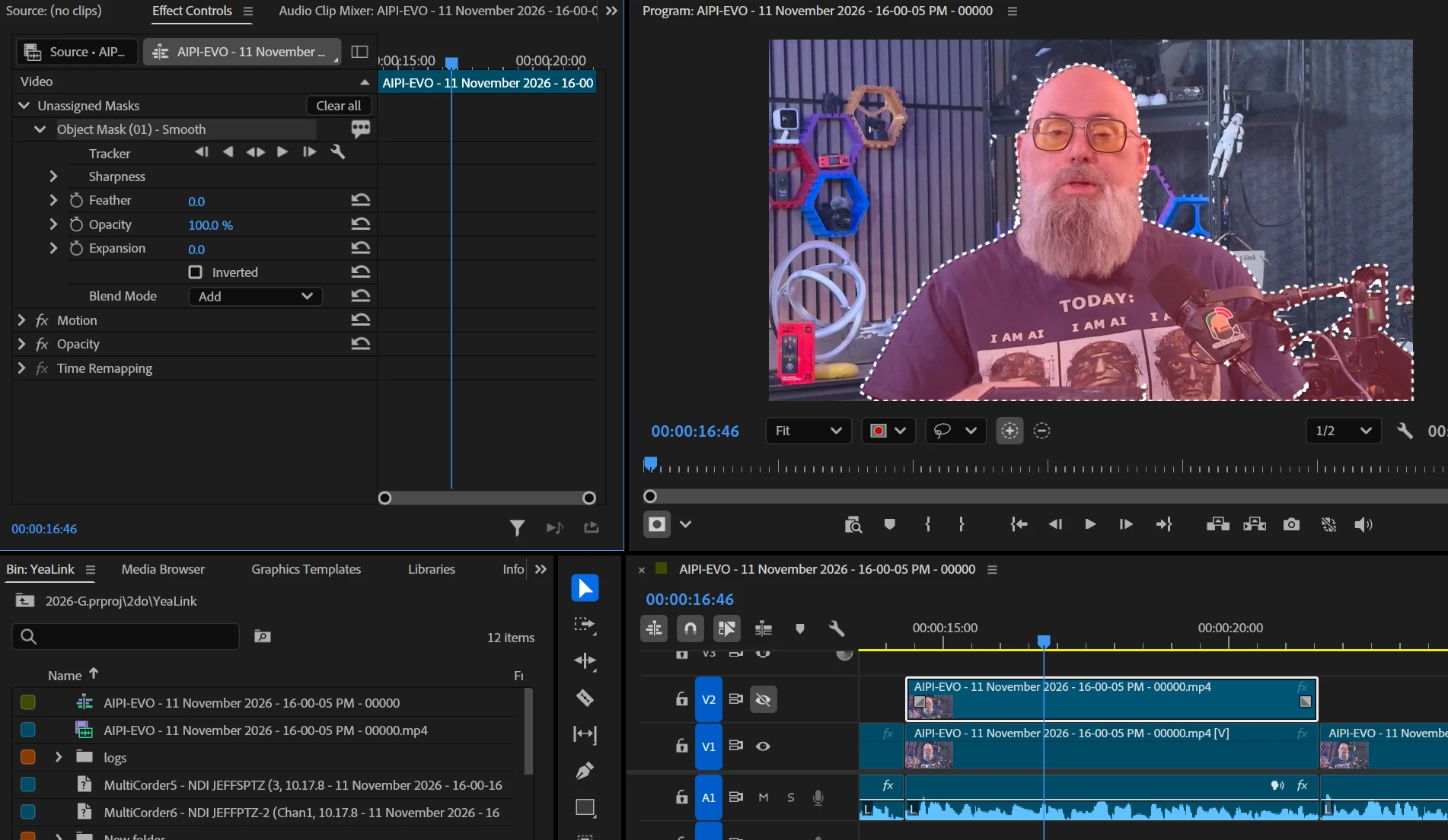
Just updated to Premiere 27 build 88, and started a project. I want to remove my background, so I duplicated my layer, and put a mask around me. 

Went to track the mask, and nothing happened. 

  • I have cleared the cache
  • I have CTRL started and turned off everything (including plugins)

It just sits and does nothing. I started over and tried again with no luck. 


    Vikas GahlautCorrect answer
    Adobe Employee
    Nov 12, 2026 11:12 AM UTC

    Hi ​@geekazine,

    Thanks for reporting this, and sorry for the trouble.

    Mask tracking doesn't run when the track's output is turned off. It looks like the track containing your clip has Toggle Track Output (the eye icon next to the track in the timeline) switched off, so nothing happens when you click track.

    To fix it:

    1. In the timeline, find the track containing the masked clip.

    2. Click the eye icon next to the track name to turn its output back on.

    3. Run the mask tracking again. It should work normally now.

    We've also added an error message that tells you when tracking is blocked because the track is disabled. That fix is in the latest Premiere Pro Beta, available through Creative Cloud Desktop, and will be in the next stable release.

    Let us know if tracking still doesn't work after that.

    Thanks!

    Vikas

    2 replies

    Vikas GahlautCorrect answer
    Adobe Employee
    Nov 12, 2026 11:12 AM UTC

    Hi ​@geekazine,

    Thanks for reporting this, and sorry for the trouble.

    Mask tracking doesn't run when the track's output is turned off. It looks like the track containing your clip has Toggle Track Output (the eye icon next to the track in the timeline) switched off, so nothing happens when you click track.

    To fix it:

    1. In the timeline, find the track containing the masked clip.

    2. Click the eye icon next to the track name to turn its output back on.

    3. Run the mask tracking again. It should work normally now.

    We've also added an error message that tells you when tracking is blocked because the track is disabled. That fix is in the latest Premiere Pro Beta, available through Creative Cloud Desktop, and will be in the next stable release.

    Let us know if tracking still doesn't work after that.

    Thanks!

    Translate
    Vikas
    geekazineAuthor
    Inspiring
    Nov 12, 2026 12:38 AM UTC

    Glad I still have 26.5.3 on. That worked without issue. 


    Translate