

Bed30321077z973
Inspiring
February 15, 2024
Answered

Transcribe a VIDEO. (projectItem) - and transcribe in general

  • February 15, 2024
  • 1 reply
  • 295 views

1)

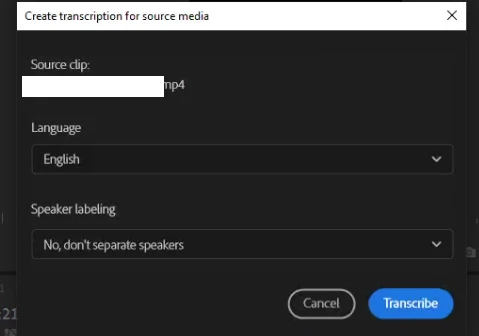
First of all, there is a missing ergonomy feature here, when clicking on "transcribe" on the menu that shows up after right clicking a video, the window should switch to the language you are trying to find simply by pressing a KEY in the keyboard.

I pressed "E" expecting it to go to ENGLISH but it did not, this is a feature that can be found in ANY software. It should be implemented.


2)

Nothing happens when I select Transcribe? Why is that? (When I try to do it again it says "RE-transcribe" as an option, and still nothing)


3) More general:
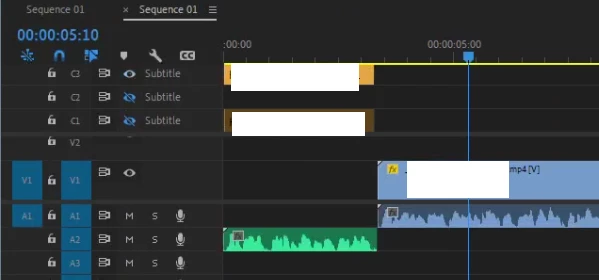


I tried CREATE NEW CAPTION TRACK:
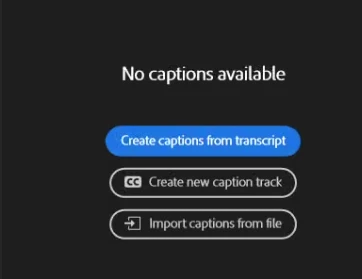
 

And it only transcribed the audio (green one) but did not transcribe the VIDEO (and its audio)

Why?

This topic has been closed for replies.
Correct answer Stan Jones

@Bed30321077z973,


First, I agree regarding using a letter to get a language from the list. Let us know if you submit it as a feature request so we can upvote it. Just click Post to Community and select "Idea" from the options.


Second, the speech to text/text-based editing have a significant learning curve. Your screenshots don't tell us whether you are working with a source media transcript or a sequence/static transcript.


See this post which addresses some of these issues:

https://community.adobe.com/t5/premiere-pro-discussions/how-do-you-delete-auto-transcription-to-use-the-re-transcribe-sequence/m-p/14439805#M491647


If you need further help, post a screenshot that shows the Text panel/Transcript tab including the bottom left, and ask any questions you have.


Stan


1 reply

Stan Jones
Community Expert
Stan JonesCommunity ExpertCorrect answer
Community Expert
February 23, 2024

@Bed30321077z973,


First, I agree regarding using a letter to get a language from the list. Let us know if you submit it as a feature request so we can upvote it. Just click Post to Community and select "Idea" from the options.


Second, the speech to text/text-based editing have a significant learning curve. Your screenshots don't tell us whether you are working with a source media transcript or a sequence/static transcript.


See this post which addresses some of these issues:

https://community.adobe.com/t5/premiere-pro-discussions/how-do-you-delete-auto-transcription-to-use-the-re-transcribe-sequence/m-p/14439805#M491647


If you need further help, post a screenshot that shows the Text panel/Transcript tab including the bottom left, and ask any questions you have.


Stan