

Randune23
Inspiring
February 1, 2022
Answered

Transcribe not working

  • February 1, 2022
  • 2 replies
  • 4861 views

So I added my videos to my sequence, highlighted all the files, went to the Essential Sound panel, clicked "Diaglogue", clicked on the text panel and clicked the transcribe sequence.


Once the transcribe box opens up it will not allow me to press the "Transcribe" button.
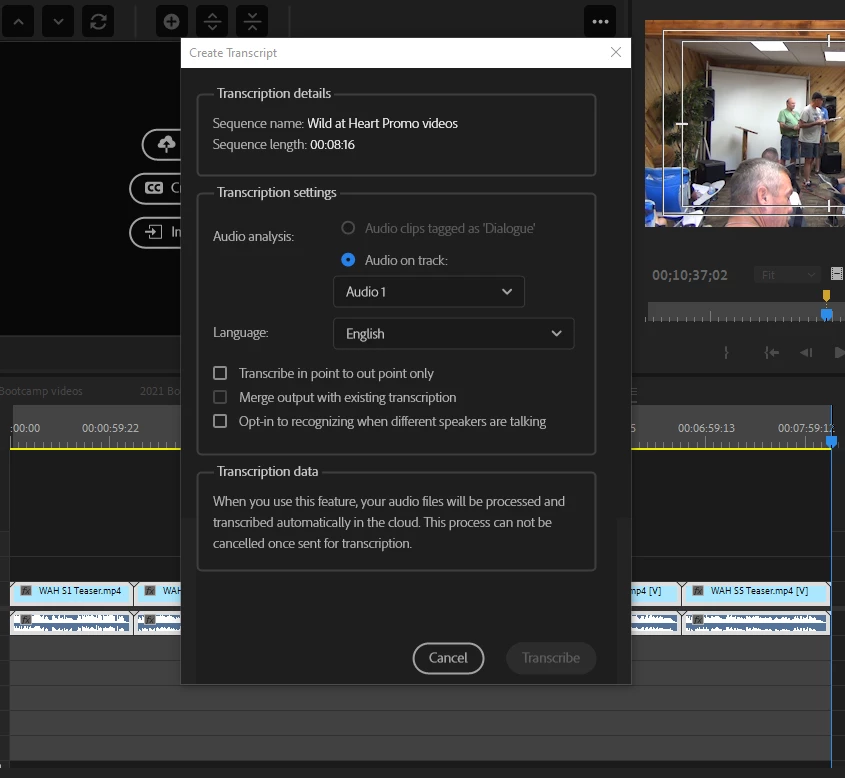
So what's up?  Why is this feature not working???  I really get tired of Adobe releasing a really cool new feature and then it stops working (Titler, EG, etc.).


Any insight out there in the land of all Adobe???


Randy

This topic has been closed for replies.
Correct answer Alexander Riss

Hi Randy,


thank you for reporting this issue. There was a brief interruption on our cloud infrastructure provider of about 5 minutes yesterday, which you might have hit. During that time some transcription requests did not get an answer from our cloud service in time and might cause the "grey button" to not light up.

If this is still not working you might also be in a state where your account information is not fully available to Premiere Pro - this can usually be fixed by signing out of Creative Cloud Desktop and back in.


Btw - the current Beta version of Premiere Pro now features offline transcriptions, if you want to try that out too (in case you are behind a firewall of your company which blocks traffic to Adobe servers).


Best regards,

 Alexander

2 replies

Purivision
Participant
October 17, 2022

I don't know why my transcript turned out like this.. i used an online narrator for mine


Stan Jones
Community Expert
Community Expert
October 18, 2022

What do you mean "online narrator"?


What language is spoken? What language did you use to transcribe?


Stan


Purivision
Participant
October 18, 2022
I used one of the text to speech website. It was English and i tried to
transcribe to English as well. --
Sincerely,
Daryl Purificacion
PurivisionVideo.com <>
408-230-1223
Alexander Riss
Adobe Employee
Alexander RissCorrect answer
Adobe Employee
February 1, 2022

Hi Randy,


thank you for reporting this issue. There was a brief interruption on our cloud infrastructure provider of about 5 minutes yesterday, which you might have hit. During that time some transcription requests did not get an answer from our cloud service in time and might cause the "grey button" to not light up.

If this is still not working you might also be in a state where your account information is not fully available to Premiere Pro - this can usually be fixed by signing out of Creative Cloud Desktop and back in.


Btw - the current Beta version of Premiere Pro now features offline transcriptions, if you want to try that out too (in case you are behind a firewall of your company which blocks traffic to Adobe servers).


Best regards,

 Alexander

Randune23
Randune23Author
Inspiring
February 1, 2022

Alexander...you are the MAN!!!  Yeah, I noticed when I hovered over the transcribe button it was talking about the cloud.  I had no idea what it meant.  So I shut down my PC, took a break, and came back and I was able to finally transcribe.  This feature is a LIFE SAVER for those of us making YouTube videos to have captioning and SOOOOO much FASTER than having to hand type and transcribe videos.


On the beta talk, I usually do not work in the beta while working on a project just in case something goes wrong.  I loved having being in the beta test group for the new captioning option last year before it even hit the beta.  Like I said earlier, it is such a great feature and it is fairly accurate (way better than my own talk-to-text on my iPhone).  There are always some funny mistakes but in the end it's an AH-MAZING feature.


Randy