
Participant
October 20, 2022
Question

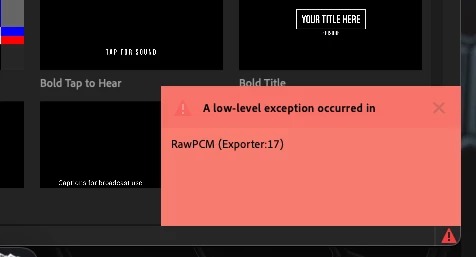
Transcribe Sequence Error - "A low-level exception occurred in" RawPCM (Exporter:17

  • October 20, 2022
  • 1 reply
  • 822 views

I'm trying to transcribe a sequence and when I go to Captions and Graphics - click on transcribe sequence - select my audio channel - then click transcribe, I get this red error box in the lower right corner that says "A low-level exception occurred in" RawPCM (Exporter:17.  


Any ideas?  


My Premiere Pro updated this morning.  The feature was working fine yesterday.  I'm sure this issue has something to do with the most recent update.  I also tried holding alt and opening Premiere to reset my preferneces but when I did, it opened Premirere but the window was not showing up.
 

This topic has been closed for replies.

1 reply

Ishan Y
Inspiring
October 20, 2022

Hey Samuel,


Welcome to the community, and sorry for the issue. Which version of Premiere Pro are you currently using? Here's how to find it. Do you have any effects added to the audio track? If so, could you remove them and then Re-transcribe? If that does not work, import the audio track to a new project and try transcribing it again.


Thanks,

Ishan

Participant
December 21, 2022

Hi 

I have the same problem. I'm using PR Version 23.0.0 on a Mac 12.5.1.

Non of the the tipps helped. Removing effects and importing to a new project had no effect. 

Stan Jones
Community Expert
Community Expert
December 21, 2022

attilag,


Thanks for reporting the workarounds you tried. That is helpful.


The error sure points to something with the audio. What format is the audio?


Let's see what @Ishan Y might have to say....


Stan