


Participant
May 23, 2026
Question

Transcription NOT Working!

  • May 23, 2026
  • 2 replies
  • 21 views

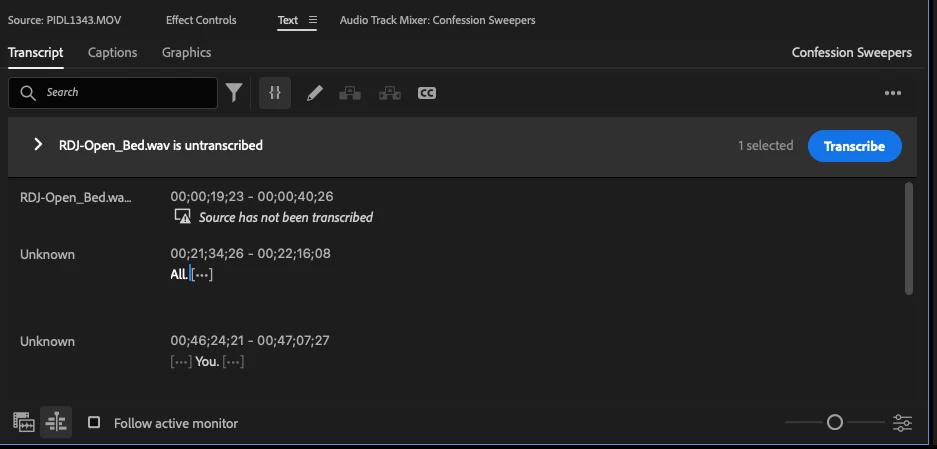
After transcribing some video clips, the transcripts NEVER appear. I load the file and check the Transcript panel and it shows the status of another element, usually the sequence, and says No Transcript. I transcribe the same clip again….same result. 

The file I transcribed is reference in Source tab. It always defaults to this random RDJ-Open_Bed. I just upgraded to 25.6.5, too.


Premiere 25.6.5 is full of bugs!! This is just one of many. I’ve been a user for 20+ years. Adobe are pick pockets. Not sure why we continue to be ripped off by them for such unstable software?? 

    2 replies

    Stan Jones
    Community Expert
    Community Expert
    May 24, 2026

    @Jeff33943836p6zx,


    What operating system? I am having no issues on 25.6.5 on Win 11. We can see those 2 bits of transcript, so something transcribed.


    You have “follow active monitor” unchecked, and it is selected for sequence/program monitor view, not source monitor. If you are wanting to see if PIDL1343.mov transcribed, just click on the “show source monitor view” or check “Follow active monitor,” then click on the source monitor panel, then back to the Text panel/transcript tab.


    The  RDJ-Open_Bed shows because you are in sequence/program monitor view, and that track is not transcribed. If you don’t want to transcribe it, just ignore that, or in the transcript view options, uncheck show untranscribed sources.


    Stan


    Community Expert
    May 24, 2026

    transcription needs a lot of work on improvements.

    post in ideas and we willl vote