
Participant
October 7, 2021
Question

Trim and Copy Original Files in Premiere like Resolve

  • October 7, 2021
  • 2 replies
  • 894 views

Does anyone know a way of trimming the original files in Premiere's project manager like you can in DaVinci Resolve's Media Manager?
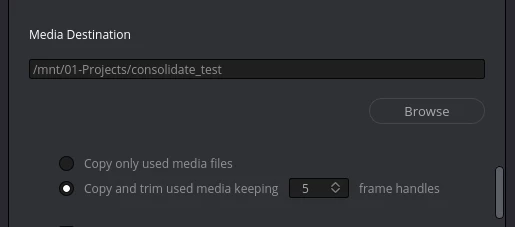


It is very simple to do in Resolve but I can't trim my clips with handles for grading/comping if I have to transcode them and lose a bunch of information.


Does anyone have a workaround for this? At the moment I export a FCP XML for DaVinci and trim there. It's not ideal but it works for now. Would prefer to keep it all in Premiere as that's my editor of choice.


Thanks in advance.

This topic has been closed for replies.

2 replies

Participating Frequently
November 5, 2021

Hello ! 


There is no native solution for trimming clip without re-encoding (= transcoding). Also the Project Manager suffers from some problems in some projects or limitations even for a simple "Collect & Copy".  


That's why we developed at Autokroma a third party paying plugin, an alternative of the Project Manager called "PlumePack". With the Premium version you can trim your files as in Resolve, but even more ! You can even trim long GOP files such as H264 or H265 (it will trim at the "I-Frames" and so do not break the GOPs). We focused a lot on the "Analysis & Reporting" part, so you can see what should happen to your project without any action (just an Analysis) which you can launch on your project with the free version. At the end a full report is generated with all information needed ! 


Check the difference with the Project Manager here : https://www.autokroma.com/blog/PlumePack-Premiere-Pro-Project-Manager-Difference

More information on PlumePack here : https://www.autokroma.com/PlumePack


Best,

Nicolas from Autokroma

Mike Dziennik
Community Expert
Community Expert
October 10, 2021

The FCP XML sounds like the best choice for now. The project manager doesn't support trimming clips natively.