Participant
July 12, 2018
Answered

"Trim blocked on Video 1" issue

  • July 12, 2018
  • 2 replies
  • 7725 views

As the title says, each time I try to trim clips i keep getting the same notice "trim blocked on video 1".

This is frustating because I don't know what I'm doing wrong, the clips you see in the image have enough head and tail footage needed to perform the trim and none of the tracks is locked. Ripple edit and Rolling edit work fine though.
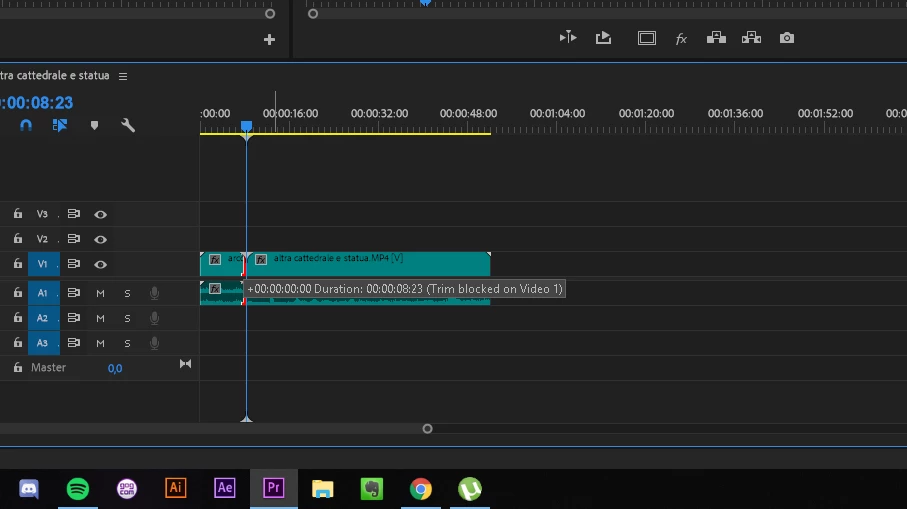
    This topic has been closed for replies.
    Correct answer Ann Bens

    the problem only occurs when i try to go over the other clip.

    That is your problem: you cannot.

    2 replies

    giancarlopm
    Participant
    July 1, 2019

    I have the solution. In the Timeline you can see at the left options (little ones) there is the Padlock - V1 - (kinda schedule) - and finally an eye. You have to click (to block) the kinda schedule one. But you have to do it in every line you are working (A1, A2, V1,  V2). After that, you will be able to use the ripple edit tool (B). I had the same problem for a week, so now I share the solution!

    Participant
    July 5, 2021

    I am having the same issue, and I don't know what you mean by the "kinda schedule" one.  Do you mean the Toggle Sync Lock?  I tried clicking that , but it still didn't work.  Thanks.

    henryxd
    Participant
    December 6, 2021

    What I did was hold down Ctrl and drag the edge of the clip. It worked for me. I think it's the shortcut for the Ripple Edit Tool. 

    Ann Bens
    Community Expert
    Community Expert
    July 12, 2018

    The video part consists of two parts hence the block.

    Which one are you trying to trim and to which direction.

    Participant
    July 12, 2018

    I want to trim the first one on the second one.

    I noticed that it works only if i shorten the second one and then stretch the first one, the problem only occurs when i try to go over the other clip.

    Ann Bens
    Community Expert
    Ann BensCommunity ExpertCorrect answer
    Community Expert
    July 12, 2018

    the problem only occurs when i try to go over the other clip.

    That is your problem: you cannot.