
picturerealmstudios
Participant
August 15, 2020
Answered

Trouble saving all sequences in one project

  • August 15, 2020
  • 2 replies
  • 2977 views

I have Pro CC 2020. When I save a project. Close project. Re-open Premiere, only one of the sequences open at random (for example Sequence3) and 1, 2 is missing. Unless I open up multipe previous files (because I tried resaving new files to see if this would work), then all the sequences turn up random order, some not updated, others updated. I've researched endlessley on forums, youtube, online and they don't seem to have a recent 2020 version video how to fix this. Other blogs and posts say to change the workspace layout, preferences options, double-click on tabs, but that doesn't work and most videos are outdated. I even desperately went to programs built in HELP and TUTS videos.


I want to know how to save / open a project with all the current multiple sequences, so when I re-open one project file - all sequences are there. I also would like to know how to back up my sequences in the project tab list, as all the sequences I was working on isn't listed or saved there. This is also at random and only seems to have one of the sequences in the list. When I try to drag a sequence from the timeline into the project tab, it just comes up as a timeline and not attached to any project.


Since I've updated to 2020 - this hasn't been intuitive. I was working on a 2019 file though and wondering if that is the issue. There is no crash problem. When I save or open the program doesn't crash or freeze. It is just the way it is saving. Any help is greatly appreciated.


This topic has been closed for replies.
Correct answer R Neil Haugen

You've got multiple bins of mulitple projects, all in different 'windows' or panels. Knowing how confusing a mess this can create unless the user is very careful how they work, I'm with Ann ... that's the problem. Things are in one project, you switch to another project panel which switches which project is active, save a sequence ... and it's now in that project. With duplicated media assets and all.


At this point you need to get your projects all open at the same time, and sort out where you have things.


In a Productions workflow, you can have multiple projects open as a natural thing without duplications, but not in as 'stand-alone' or typical Premiere workflow.


Neil

2 replies

R Neil Haugen
R Neil HaugenCorrect answer
Legend
August 15, 2020

You've got multiple bins of mulitple projects, all in different 'windows' or panels. Knowing how confusing a mess this can create unless the user is very careful how they work, I'm with Ann ... that's the problem. Things are in one project, you switch to another project panel which switches which project is active, save a sequence ... and it's now in that project. With duplicated media assets and all.


At this point you need to get your projects all open at the same time, and sort out where you have things.


In a Productions workflow, you can have multiple projects open as a natural thing without duplications, but not in as 'stand-alone' or typical Premiere workflow.


Neil

Everyone's mileage always varies ...
R Neil Haugen
Legend
August 15, 2020

Still trying to sort out your problem ... is it that sequences aren't in the bin where they were saved in the project panel, or just not appearing in the timeline panel?


And I notice you have a bin open as a separate panel ...


Neil

Everyone's mileage always varies ...
picturerealmstudios
Participant
August 15, 2020

Thanks for having a look at it.


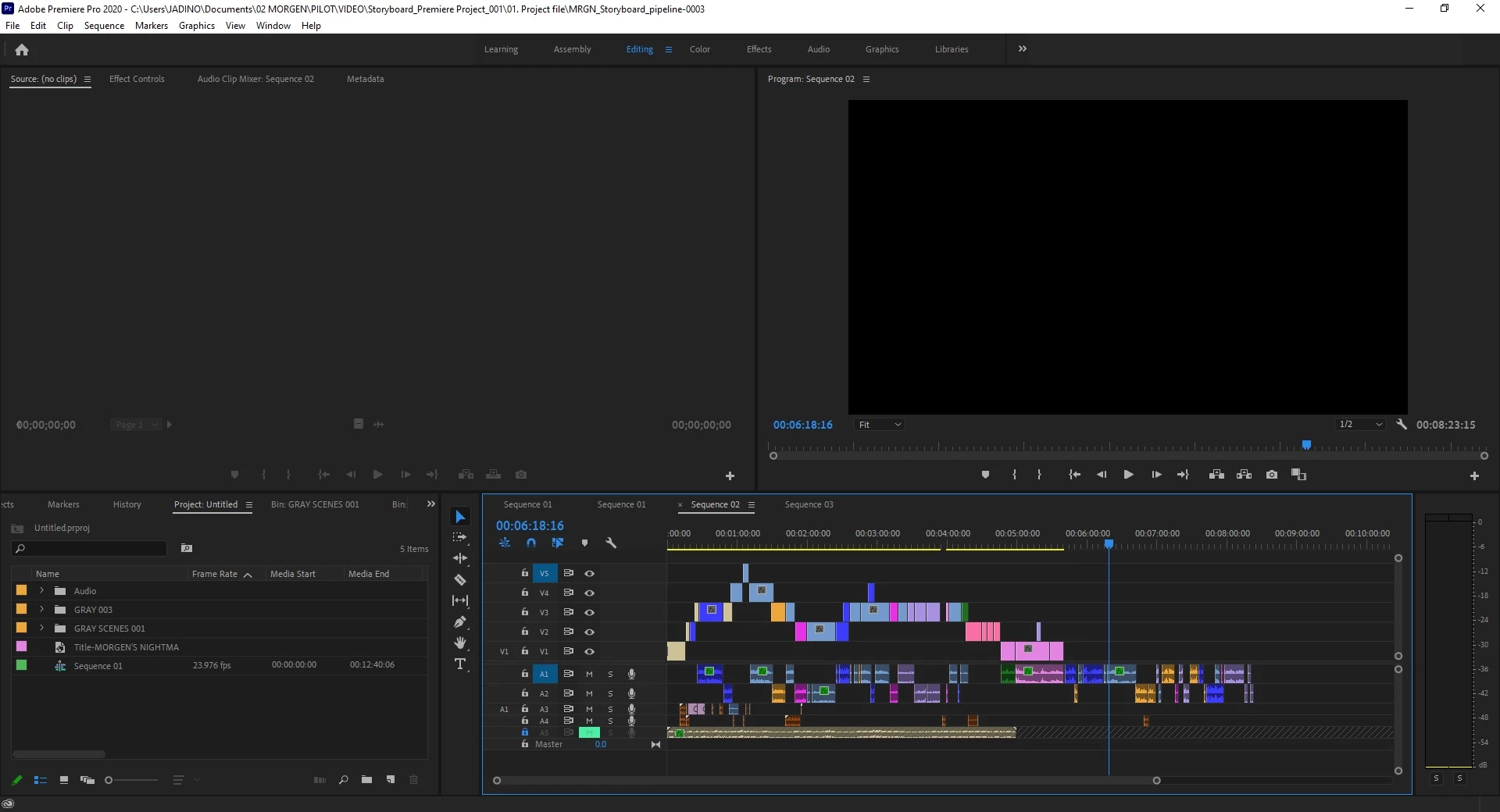
So all the sequences I'm working on which is (Sequence 01, 01, 02, 03), yes I have two sequence 01's because for some reason it has gone that way, all of them won't show up on the timeline when I open my latest saved file - which is untitled. Sometimes, it woud just be Sequence 03 only when I open file 04. Then I would open another saved file, and I'll get all the sequences at once but I won't get the recent ones.


Here is a screenshot showing what I mean. The first screenshot is Untitled file.

Study sequence 002 - this is not the most recent and I have saved it before closing the whole program down.


So I closed the file Untitled, opened up a different version and I get sequence 2 with the updated timeline and the other three. But now I'm missing the other Sequence 001.

To retrieve Sequence 01, I open up another file version 01 and so it gives a platter of sequences. I do get the sequence 01 that I wanted, but now I've got both the updated timeline and the old timeline of sequence 02, double-ups of sequence 03. And when I look at my panel list, I have sequence 01 and 04, 3 is probably floating in a seperate bin somewhere. Sequence 02 on my panels are non-existent. It is a hot mess.


I think the only solution would be to drag just the four main sequences (01, 01, 02, 03) all updated ones into the panel. I'm just not sure how to do that. Then hit save and hopefully everything will be in one file, instead of multiple.


I'm wondering if I should also reset my preferences or something. I haven't touched or changed anything on preferences or workspace layout as I've just started to use it since transferring from laptop to PC.


The Bin panels are seperate and not in the project panel, but they are just single images and audio placed into the timeline.


Confidence, personality, knowledge and listening is the key to getting these people to pay for art! LOL.
Ann Bens
Community Expert
Community Expert
August 15, 2020

Looks like you have more then one Project open, hence the confusion.