



AndrewTheGreat
Known Participant
January 15, 2026
Question

Trying to figure out how to retain clips order when dragged into Project bin and back

  • January 15, 2026
  • 1 reply
  • 49 views

Hi, community. As the title implies, I'm trying to figure out how to make a group of clips in the timeline retain their order when they are dragged into the project bin and back into the timeline.

Because the problem is this:
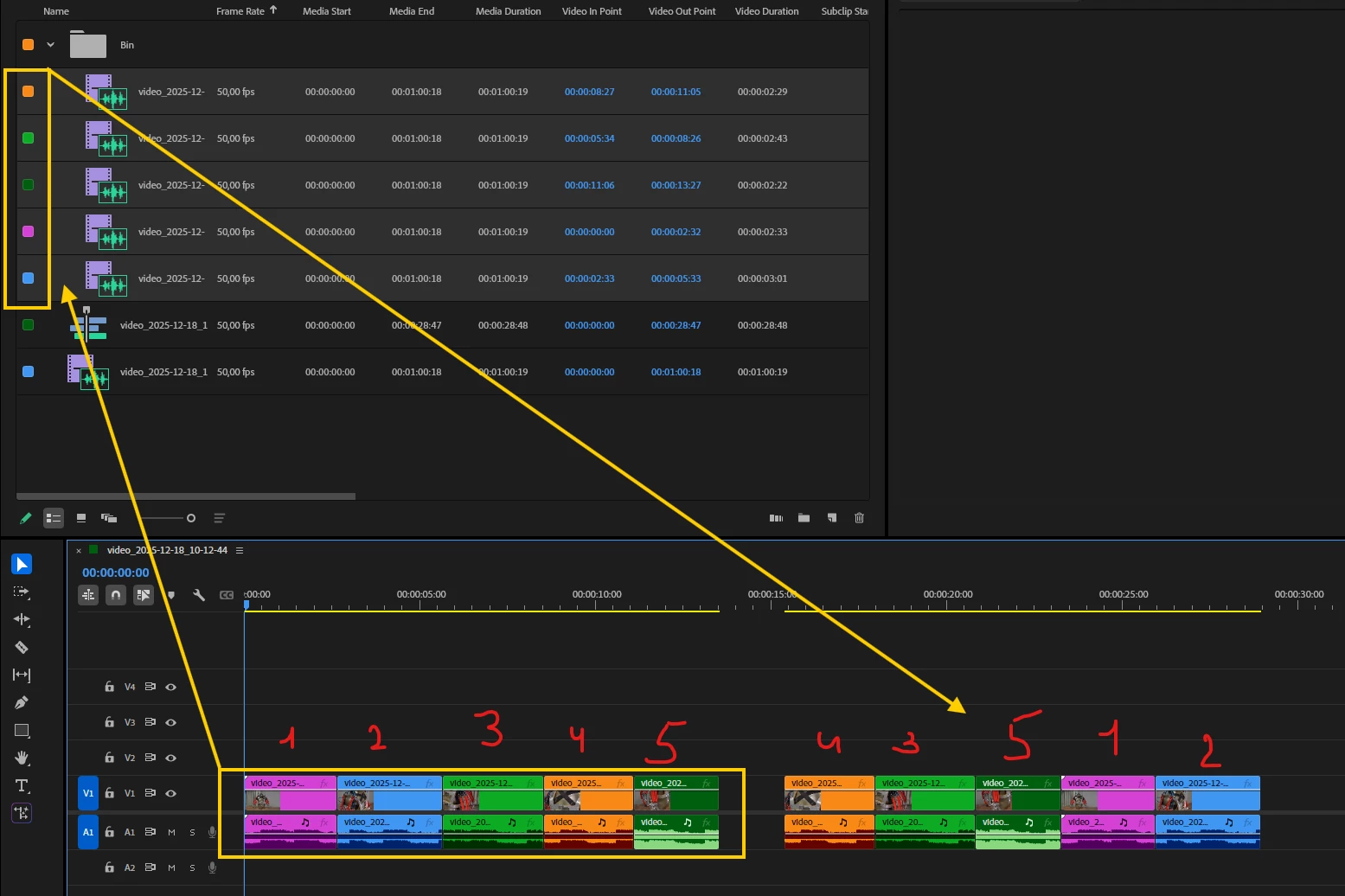
874608i7687EFA6E1A22D27.png

The order changes both in the Project bin (see the first two clips colour tags) and gets even worse when back in the timeline. Selecting the clips one-by-one with Shift doesn't work. Changing the sorting order in the Project bin doesn't work either. The only way to make it retain the original order is to make a subsequence out of the selected clips but this is not a way out in my specific case. I also tried to change the sorting order based on the clips resulting length, timecodes and so on and the order always gets screwed up


Any ideas?

1 reply

creative explorer
Community Expert
Community Expert
January 23, 2026

@AndrewTheGreat Have you tried to rename your videos? I use a different video app for work, and it had a similar issue; and I was told by a colleague to rename my videos, for example, I had a close-up, top-view, intro, and action... Premiere will alphabetize them as: Action, close-up, intro and top View. So, I would rename them as 01-action, 02-intro, 03-close-up, 04-top-view — and that worked for me. It's a little more work.... but it was a quick fix. 

In your case, since it looks like the same date, you can just rename the 5 as 01, 02, 03, 04, 05 and should organize in the same order

m
AndrewTheGreat
Known Participant
January 23, 2026

Hi, @creative explorer 

I haven't and I won't because those are corporate videos that are stored under the the names cameras give them, as well as folders and subfolders. I have to stick to the file structure as is, because there are other editors that may work off the corporate network disks with those files, as well as those who may be given my projects to finish or change in some time or after years. Renaming everything will confuse this whole corporate database. 

What I'm looking for here is something simpler then renaming, automatic. So far it looks like Premiere Pro can't do it at all...

Stop trying to edit and EDIT!