Participating Frequently
September 20, 2021
Question

Trying to get this optical flow effect to work

  • September 20, 2021
  • 4 replies
  • 1838 views

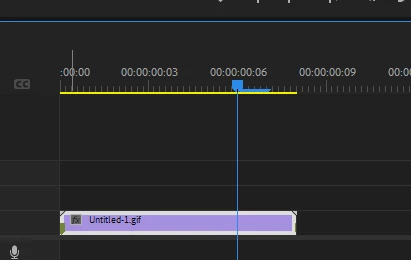
Hi all, I'm new to premiere so I'm sure I'm doing something wrong, but I'm trying to get this effect to work (linked below). I got the gif exported and I put it into Premiere. I don't know if this is right or not but the timeline marker that shows where you are in the clip has this long bar after it that matches the 5 seconds of each frame. When I play the clip it stalls for 5 seconds then the marker jumps to the next image. I do the 1700% and Optical flow as shown but the clip then shrinks down to just the first frame with that same bar after the timeline marker. So none of the other photos play and I can't even see if the effect worked or not. 

There's so much I don't understand on the Premiere side that I'm probably not explaining this well, but hopefully the tutorial I was trying to follow helps. 
https://www.tiktok.com/@cveeps/video/6985281058795195653?sender_device=pc&sender_web_id=7010092254682842629&is_from_webapp=v1&is_copy_url=0

This topic has been closed for replies.

4 replies

Inspiring
September 24, 2021

Hi, since I asked for the Gif, I thought I should do a short clip. It's not as dramatic as you've hoped for but I didn't spend lots of time on it. 

- As expected the tutorial obviously skipped quite a number of steps to make it look easy.

- The highlight of the video is the hand drawn animation and not the subject. 

- This works best with a sequence of shots without much movement on the subject, shot with side to side camera movement (eg left to right - like capturing for panaromic). You can see the tictok ref, it's a mix of several sequences.

- still are imported into Photoshop to add animated lines, exported and brought into Premiere Pro.

- Jpegs are then dropped into timeline, dissolves are added between frames. You can experiment with morph cut as well to see which works best.

- speed and optical flow are done to smoothen up the transitions.

All the best. 

Participating Frequently
September 28, 2021

Hey thanks for your help. This is definitely the closest thing to the original. I'll have to play around with this method and take some photos that work better for the technique.

Giddy_personality5D25
Adobe Employee
Adobe Employee
September 28, 2021

Hi,


How any animation, video or gif works is by frame rate and continuous movement of images in a sequence. So the blue bar depicts the frame rate it has used frome the gif that you imported to premiere to do this. What you can do is bring in. image sequence that you can export from photoshop using this gif and time each image based on the duration you want each frame to be and then export it as a video or gif again. This will solve your issue. It is better to use After effects for smooth and better morphing sequence of your images.

Inspiring
September 21, 2021

Have yout tried convert your Gif to MP4 or another video format (not image format like Gif), then change its duration?

######Raizen 7, 40Gb Ram, RTX 3060, Win 11 -- All of Software in the world are just tools. Buy it if it works for you :)
Participating Frequently
September 21, 2021

Just tried it. I'm able to get the images to play like a slide show but I'm still not getting that morphing effect I'm looking for. Any ideas.? I feel like the tutorial I was following skipped something necessary.

Inspiring
September 21, 2021

If you don't mind, can you post a few seconds (10-15) of your gif here so I can have a look ? Feels like he used photoshop to line up photos the export them and do morph cut to join all the frames together 

Inspiring
September 21, 2021

Why don't you try a slower speed, say 800% and increase from there. 

Sounds like your gif is too short for 1700%


Cheers

Participating Frequently
September 21, 2021

 I tried it and it didn't do anything different. Thanks for the reply though!

Ann Bens
Community Expert
Community Expert
September 20, 2021

If you want to learn Premiere properly, take a course at

https://www.linkedin.com/learning/me?trk=nav_neptune_learning