
Participant
December 16, 2023
Answered

trying to reset the windows to their original positions.

  • December 16, 2023
  • 2 replies
  • 767 views

i dont know how i moved the windows around to the places their in now, but i did,  i'm watching a teacher using Pr and his windows are in the original positions and mine are'nt, so what i would like to know is does any one know how to put all the windows back in the places they are in when Pr is first downloaded so i can follow my teacher easyer and not get mixed up trying to follow him because my windows ara'nt in the same places that his are in. can some one PLEASE HELP me out with this problem.
This topic has been closed for replies.
Correct answer Richard M Knight

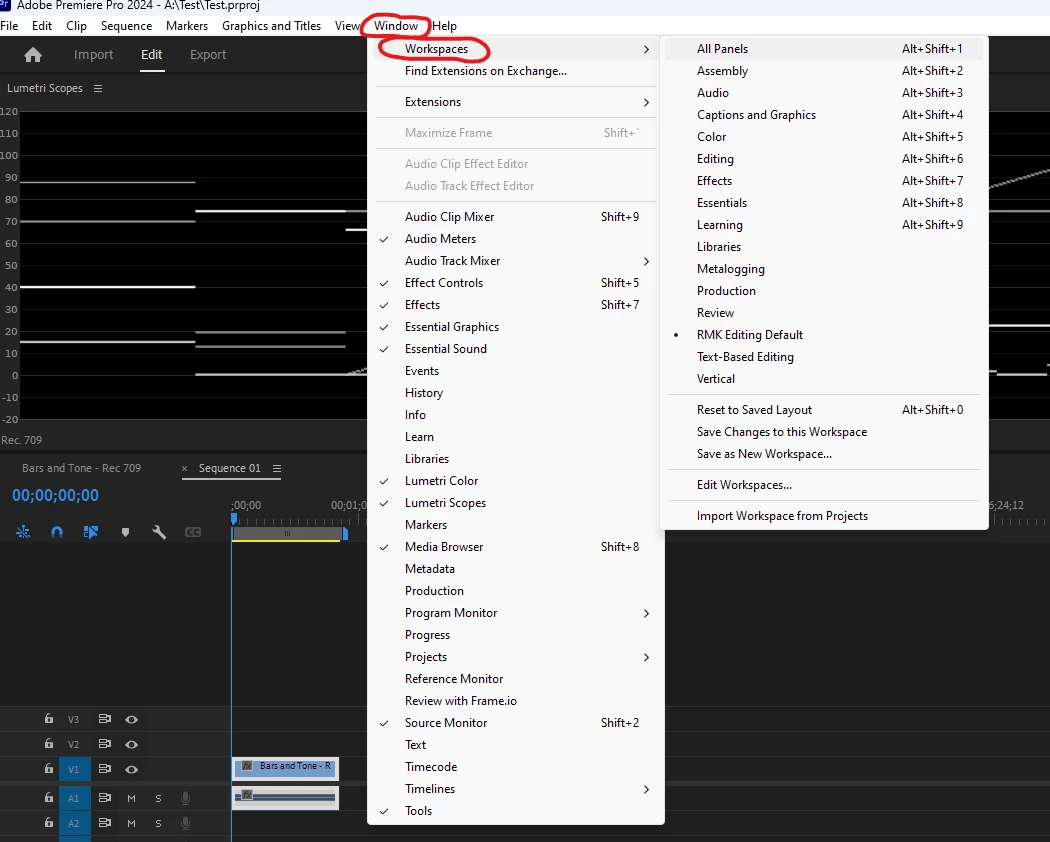
Try choosing a different workspace:


2 replies

Mathias Moehl
Community Expert
Community Expert
December 16, 2023

In addition to what @Richard M Knight said: If you changed the windows of the current workspace, you can also choose
Window->Workspaces->Reset to Saved Layout

which will to back to the default for the current workspace (assuming that you didn't actively save the changed layout).

Mathias Möhl - Developer of tools like BeatEdit and Automation Blocks for Premiere Pro and After Effects
Participant
January 15, 2024

Yeah. That doesn't always work. This forum is a joke.

Richard M KnightCommunity ExpertCorrect answer
Community Expert
December 16, 2023

Try choosing a different workspace: