


david.parke
Inspiring
March 18, 2025
解決済み

Typing TC that starts w/ a 1, 2, or 3 in the Timeline, Preview, or Program monitors requires a 0

  • March 18, 2025
  • 返信数 5.
  • 784 ビュー
  1. Version of the app: 25.1.0 (build 73)
  2. Platform and OS version: macOS 15.3.2 (24D81) (computer specs in signature but was able to recreate on two separate M1 Max 2021 MBPs)
  3. Basic steps to reproduce the problem: In both projects and productions, load a clip or timeline/sequence into the source monitor and try to go to 1:03 by typing "103" with the number-pad on a full-sized keyboard. Do the same in the program or timeline panels. Timecodes starting with 1, 2, or 3 do not populate without typing a 0 first, therefore initializing the input.
  4. Expected result and actual result: Typed timecode should not require a 0 to initialize. Jumping to 1:03 in the timeline should just require "103" to by typed on the 9-key number-pad. What's happening is "103" is only typing "03," therefore only jumping to :03. The "1" is being completely missed. This also happens with 2s and 3s. Typing "206" to go to 2:06 jumps only to :06. "321" to go to 3:21, since there is no 0, 4, 5, 6, 7, 8, or 9, does absolutely nothing. See this video to see my walk-thru demo.

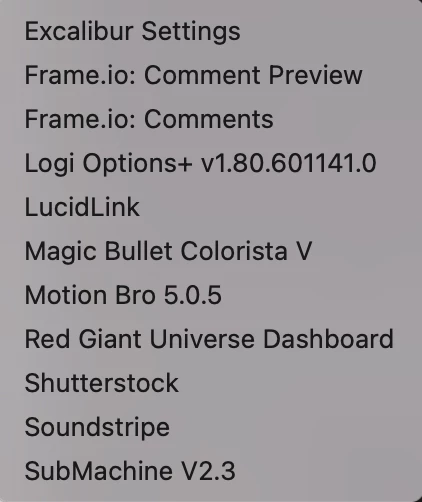
    5. Do you have any third-party plug-ins or panels installed (even if they aren't being used when you encounter the bug)? See attached photo:
     

解決に役立った回答 david.parke

Well color me embarrassed. I do have a custom keyboard layout and the 1, 2, and 3 were mapped to multicam switching. And of course the last .kys edit was a month ago. Couldn't tell you what I changed then and this particular mapping to multicam switching seems odd but not unheard of for me. Welp! I went ahead and removed it and Premiere behaves as normal. Thanks for the prompt response!

返信数 5

Community Manager
March 18, 2025

Glad to hear you were able to resolve it and that your new keyboard isn't the problem.  Good luck with your project.

david.parke
david.parke作成者
Inspiring
March 18, 2025

@Rach McIntire since you asked, this is the keyboard in question: https://logickeyboard.com/shop/avid-media-composer-mac-backlit-titan-keyboard-5036p.html

But can confirm that I am back to flying without issue. Thank you again!

-- Current system (March 2025): Mac Studio 2023 Apple M2 Ultra 192 GB RAM macOS 15.3.2 (24D81) | Premiere Pro 25.1.0 (build 73)
david.parke
david.parke作成者解決!
Inspiring
March 18, 2025

Well color me embarrassed. I do have a custom keyboard layout and the 1, 2, and 3 were mapped to multicam switching. And of course the last .kys edit was a month ago. Couldn't tell you what I changed then and this particular mapping to multicam switching seems odd but not unheard of for me. Welp! I went ahead and removed it and Premiere behaves as normal. Thanks for the prompt response!

-- Current system (March 2025): Mac Studio 2023 Apple M2 Ultra 192 GB RAM macOS 15.3.2 (24D81) | Premiere Pro 25.1.0 (build 73)
Kevin J. Monahan Jr.
Legend
March 18, 2025

Hi @david.parke,

Thanks, Rach. David, like Rach, I also could not reproduce the issue. Can you try updating a driver?


Thanks,
Kevin


Kevin Monahan - Sr. Community and Engagement Strategist – Adobe Pro Video and Audio
Community Manager
March 18, 2025

Hi @david.parke


Thanks for your excellent bug report and video. You answered several of my questions in it, so thank you. In a quick test, I was not able to reproduce the issue with my Mac wireless or laptop keyboards, but I will dig into it more. Has nothing in your keyboard shortcut mapping changed? If you try to go to 1:11, does it take the second two 1s? Could you also post the keyboard specs here so I can see if we have one of those around?  It's an interesting problem, for sure.  I hope we can help you soon.